A shopper is on her phone, thumb over checkout, trying to decide if that jacket will pull across the shoulders or hang correctly. She doesn't need a prettier product photo. She needs evidence she can trust about fit, drape, and silhouette on a body like hers. That distinction changes how you should build, buy, and evaluate photorealistic rendering for apparel.
Table of Contents
- What Photorealistic Rendering Actually Means
- How the Rendering Pipeline Got Here
- Lighting, Materials, and Cloth Simulation Working Together
- The Quality Versus Performance Tradeoff
- Choosing Between Real-Time Engines, Path Tracing, and Neural Rendering
- When Realism Helps Trust and When It Hurts
- Best Practices for Implementing Photorealistic Virtual Try-On
- Measuring Success Beyond Visual Quality
What Photorealistic Rendering Actually Means
She zooms in. The fabric looks sharp, the model looks polished, and the color looks rich. Yet she still can't tell where the sleeve ends, whether the waist sits high, or how the cloth folds when an arm bends. Sharpness hasn't answered the fit question.
Photorealistic rendering is the work of simulating how light, materials, bodies, and cameras interact so a generated image behaves like a photograph of a real garment. It's not a filter or a single effect. It's a stack where each layer has to agree with the others, or your shopper's eye catches the mismatch even if she can't name it.
The Stack Behind a Believable Try-On
Four systems have to work together before a render earns trust on a product page.
- Visibility: The system determines what's seen, what's hidden, and where one surface occludes another at sleeves, collars, and layered hems.
- Illumination: Light arrives from direct and indirect sources, bounces between surfaces, and creates soft shadows that reveal depth instead of flattening the garment.
- Material response: Cotton, silk, denim, and performance knit each reflect, absorb, and scatter light differently as the viewing angle changes.
- Camera response: Focal length, depth of field, and motion effects shape proportions, so a correct garment doesn't look stretched or miniature.
Raise resolution without fixing those systems and you get a larger, clearer fake. The seams stay too perfect, shadows stay too hard, and folds don't correspond to gravity or body shape. Shoppers read that inconsistency as risk, especially for close-fitting items where a small visual error changes the size they'd choose.
A render is useful for try-on when it helps a shopper judge a decision, not when it merely looks impressive in a demo.
Treat photorealistic rendering as an evidence interface. Every highlight, fold, and shadow either supports a claim about how the garment will look and fit, or it undermines that claim. That framing keeps engineering choices tied to conversion and returns instead of visual awards.
How the Rendering Pipeline Got Here
A vendor demo shows a leather jacket under studio lighting and it looks flawless. Then the same pipeline renders a matte cotton tee with plastic-looking highlights, and the credibility evaporates. That gap usually traces back to which layer of rendering history the system implements versus which parts it approximates.
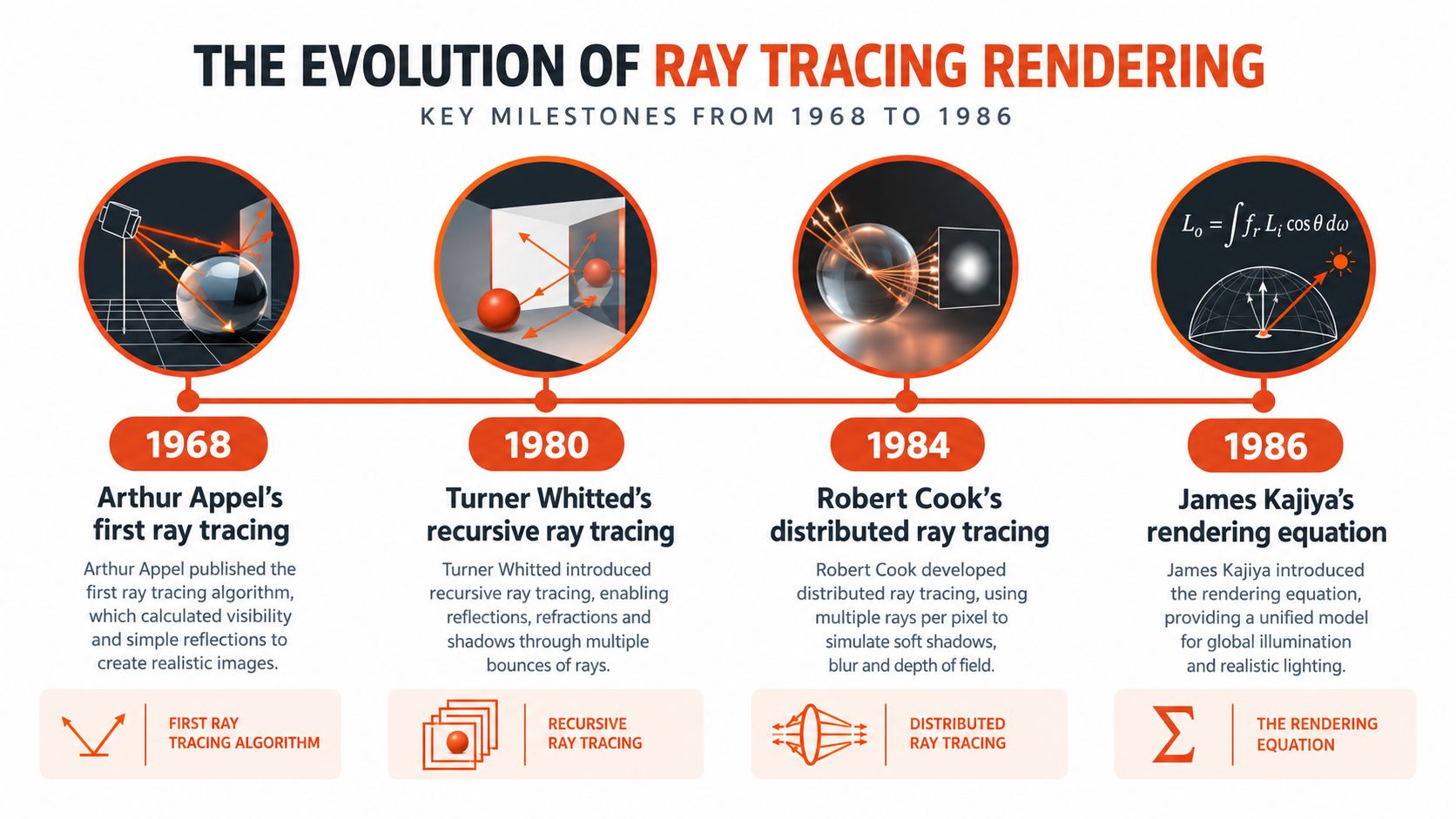
Arthur Appel described the basic ray-tracing idea in 1968 for solving visibility and shadow problems. Turner Whitted extended it in 1980 with recursive ray tracing, modeling reflections, refractions, and shadows as rays bounce through a scene, as documented in the history of physically based rendering in the PBR Book. Recursion matters for apparel because buttons, zips, glossy fabrics, and skin redirect light rather than receive it.
Each milestone after that added a specific evidence capability to the pipeline:
| Milestone | What it added | What it fixes on a product page |
|---|---|---|
| Recursive ray tracing, 1980 | Reflections, refractions, and shadows that respond to the scene | Hardware and sheen fabrics reflect their surroundings |
| Distributed ray tracing, 1984 | Motion blur, depth-of-field blur, glossy reflections, soft shadows from area lights | A collar's soft shadow shows how fabric sits away from the neck |
| Kajiya's rendering equation, 1986 | A general framework for how light transports through a scene | Indirect bounce gets calculated consistently instead of painted in |
A pipeline missing the 1984 layer produces hard-edged shadows that flatten construction. One missing the 1986 layer fakes indirect light, which is why dark garments collapse into featureless black in some renders and hold fold detail in others.
Early methods produced convincing images, but compute cost kept them out of interactive commerce for decades. Vendor age matters less than which layers of the stack run in production. When you evaluate a try-on provider, exploring CGI verification methods gives you a check on output claims, and the geometry side depends on capture quality, covered in this overview of human body scanner approaches. Geometry, light transport, and verification either align or the render stops functioning as evidence.
Lighting, Materials, and Cloth Simulation Working Together
A linen shirt and a performance jersey stress a pipeline in opposite ways. Linen shows coarse texture, soft folds, and muted highlights. A jersey stretches, clings, and produces sharper view-dependent sheen as the torso turns. If your system treats both as colored surfaces wrapped around a body, both will look wrong.
The diagram below shows why these pillars can't be tuned in isolation.
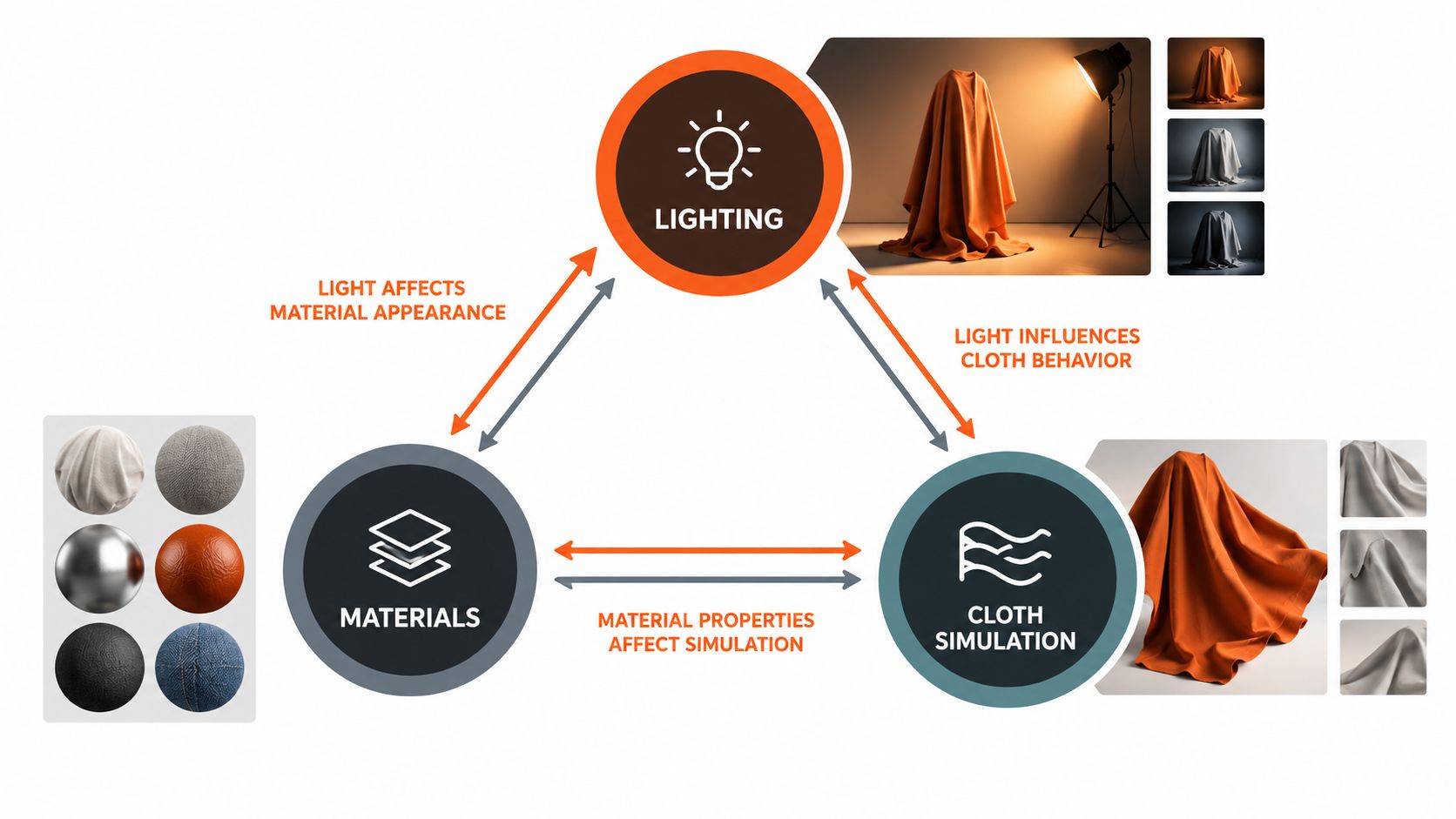
Physically based lighting models area lights, indirect bounce, and shadow softness based on light size and distance. A single hard light flattens a garment and hides construction. Environment lighting wraps illumination around the body, reveals folds gradually, and keeps dark fabrics from collapsing into featureless black.
Materials and Cloth Do Different Jobs
Materials define how a surface responds at each point. Microfacet reflectance controls the spread of highlights, subsurface response matters for skin at necklines and wrists, and anisotropic or sheen behavior matters for silk, satin, and brushed knits. Get roughness wrong and cotton reads as plastic. Get sheen wrong and a premium fabric looks cheap under the same light.
Cloth simulation defines where the surface goes. It handles drape under gravity, stretch across shoulders and hips, collision against the body, and bunching at elbows and waistbands. A perfect material on incorrect geometry still fails because folds appear where no force would create them, or disappear where tension should pull the fabric smooth.
| Pillar | What it controls | Typical garment failure when neglected | Fix to prioritize |
|---|---|---|---|
| Lighting | Shadow softness, indirect bounce, contrast | Flat torso, crushed dark fabric, hard collar shadows | Use area and environment lighting before adding accent lights |
| Materials | Roughness, sheen, color under changing view | Cotton looks plastic, satin looks matte | Calibrate physically based values per fabric family |
| Cloth simulation | Drape, stretch, collision, folds | Floating hems, impossible wrinkles, glued sleeves | Validate deformation at joints and layered areas |
| Camera | Proportion, focal length, depth of field | Stretched torso, miniature product feel | Lock focal settings to product page framing |
Diagnose by pillar before you request more samples or higher resolution. Most apparel failures shoppers notice, such as a sleeve boundary that melts into skin or a hem that ignores the hip, start in cloth or visibility. Lighting tweaks won't rescue geometry that's already lying about fit.
The Quality Versus Performance Tradeoff
Film rendering shows what unconstrained photorealism used to cost. Pixar's Ratatouille reportedly used approximately 850 computers containing nearly 3,200 processors, with average rendering time of about 23,000 seconds per frame, according to the American Scientist account of the race to real-time photorealism. That's roughly 6.4 hours for one image, before revisions or failed renders.
The comparison below frames why ecommerce can't copy that model.
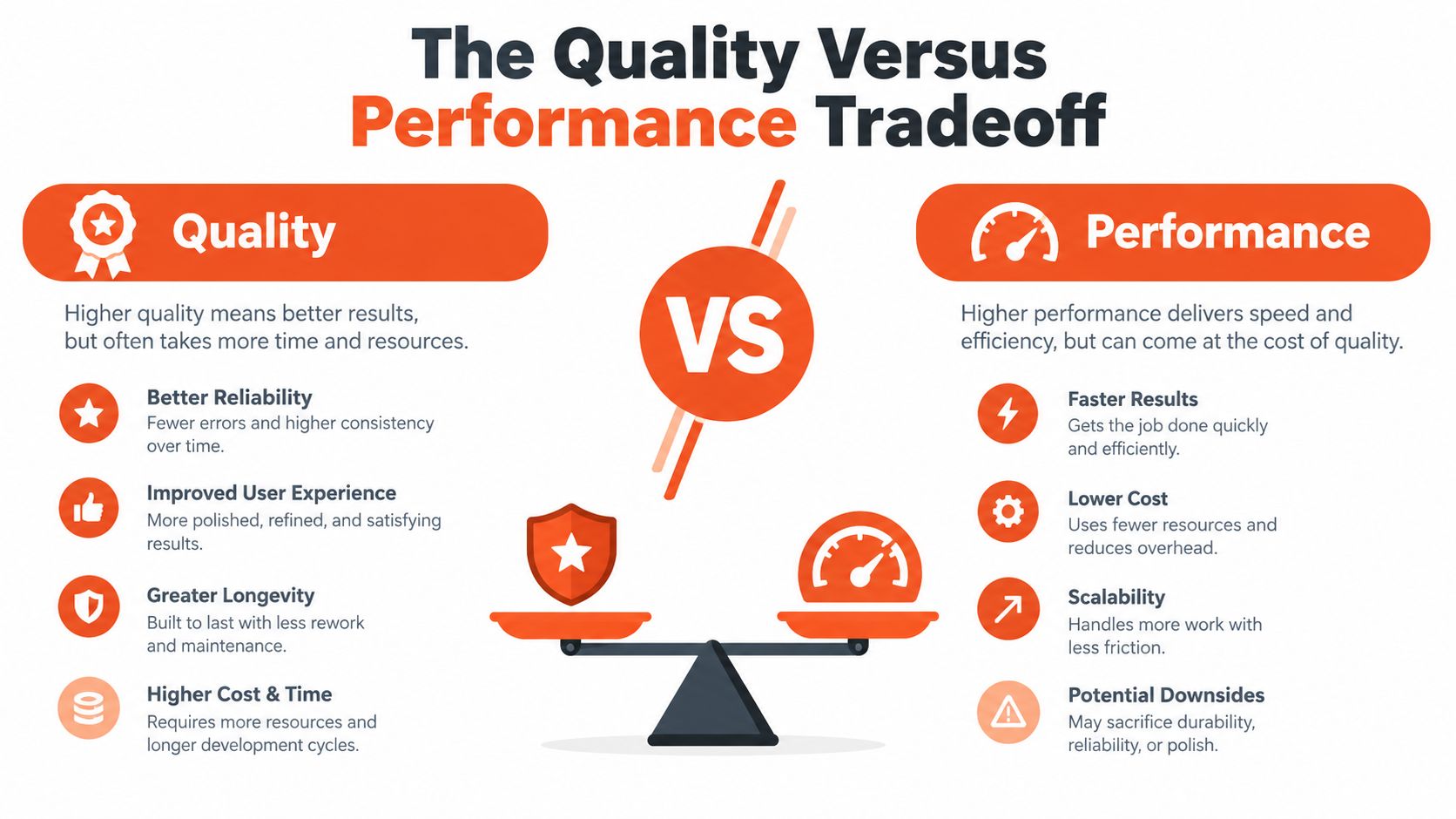
Your shopper won't wait minutes on a product page, and your catalog can't absorb hero-image budgets for every colorway. You need enough samples to control noise, enough geometry to represent construction, and fast delivery to phones. Every gain in one area charges rent in another, in compute, capture effort, page weight, or session cost.
Where Neural Rendering Changes the Equation
Neural radiance fields, or NeRFs, map a 3D position and viewing direction to volume density and emitted color, and images are produced by differentiable volume rendering along camera rays, as described in the original NeRF paper on representing scenes as neural radiance fields. For apparel, that means novel viewpoints can be generated from captured imagery without modeling every surface as a conventional mesh.
The catch is view coverage. Sparse or poorly distributed training views can cause texture hallucination, silhouette errors, and incorrect occlusion when a shopper requests an unseen angle. A convincing front view can collapse from the side, exactly where fit judgment matters for bust, waist, and hip.
The video below is useful context for how rendering quality decisions play out in practice.
Delivery matters after rendering too. Compress and size images for the storefront using the DesignStack image optimisation guide so visual quality doesn't become page-speed debt. Pick your strategy based on catalog breadth, capture workflow, and shopper devices, not on a pitch demo rendered offline.
Choosing Between Real-Time Engines, Path Tracing, and Neural Rendering
A shopper zooms from the front of a blazer to the side seam, then asks the question that decides the sale: will that shoulder sit the same on me. Treat each render as evidence for that answer. The engine is a means to produce checkable evidence: silhouette, drape, occlusion, and size cues that survive scrutiny.
| Route | Commerce job | Where it can mislead | Proof to demand |
|---|---|---|---|
| Real-time rasterization with denoising | Interactive rotation, quick PDP feedback, broad device reach | Indirect light, translucency, fine cloth detail can flatten or shimmer | Stable seams and shadows during motion on mid-range phones |
| Offline path tracing | Hero assets, campaign stills, validated reference imagery | Iteration is slow and costly for per-size output | Approved angles reviewed before publication |
| Neural rendering | On-demand viewpoints from captured imagery and body inputs | Unseen angles can invent texture or break occlusion | Side, back, and occluded views sampled per garment |
Benchmarks still need translation. NeuralBody reaches approximately 27.8 dB PSNR, 0.939 SSIM, and 0.097 LPIPS in one reported setting, while HumanNeRF reaches roughly 25.8 dB PSNR, 0.925 SSIM, and 0.072 LPIPS in another, as reported in the NeurIPS neural human radiance field benchmark supplement. Read them by failure mode: PSNR tracks pixel error, SSIM structure, LPIPS perceptual distance.
Robosize shows the neural pattern: a questionnaire plus optional selfie builds a shopper body model, garments render on that body with up to three viewpoints per session depending on plan, and a per-garment size recommendation appears on the PDP. The adjacent device limits are covered in this discussion of augmented reality clothing experiences. Before rollout, replay returns reasons against sleeve boundaries, folds, and silhouette; choose the stack whose errors shoppers rarely pay for.
When Realism Helps Trust and When It Hurts
Higher fidelity doesn't automatically produce higher trust. Sometimes it raises the standard shoppers apply, so a small inaccuracy that would pass in a flat illustration feels deceptive in a lifelike render. You need to test that boundary instead of assuming realism is always persuasive.
Attention data points to a real difference in how shoppers process generated imagery. In a 2025 eye-tracking study of 120 participants, viewers exposed to AI-generated fashion ads focused more on products and models' bodies, while viewers of real ads focused more on faces, as reported in the 2025 Journal of Global Fashion Marketing eye-tracking study. Women also spent more time viewing real fashion ads than AI-generated ones in that study.
The retail scene below is a reminder that shoppers compare digital claims against physical expectations formed in stores.

Disclosure adds another trade-off. AI-generated models with disclosure could be perceived as less human-like and realistic, potentially lowering trust and increasing perceived risk, even when overall trust differences weren't statistically significant. Hiding disclosure isn't the answer. The practical question is how much explanation helps shoppers calibrate what they're seeing.
Practical Trust Controls
Show multiple angles instead of one flattering view, preserve recognizable garment details such as stitching and closures, and label what's simulated versus what's guaranteed. Give shoppers a choice between selfie-based visualization and a model-based preview when privacy or comfort affects adoption. Optional social proof for similar body profiles can help, but only if it doesn't substitute for garment-level evidence.
Practical rule: If confidence is low, say so and route the shopper to a model preview, better inputs, or size guidance rather than rendering a confident-looking guess.
Measure trust separately from clicks. Track add-to-cart behavior, size exchanges, return reasons, and support contacts by disclosure level, garment category, and audience segment. Realism helps when it reduces uncertainty. It hurts when polish makes an unverified fit claim look certain.
Best Practices for Implementing Photorealistic Virtual Try-On
A stretch-knit dress drapes beautifully in your render, the shopper orders her usual size, and the package comes back three weeks later. Pretty pixels, wrong evidence. Deployment is the easy part; per-garment fit validation is where the work lives.
Start with integration your team can maintain. A one-click Shopify app covers many stores, while a generic JavaScript snippet serves non-Shopify catalogs without a rebuild, and this introduction to JavaScript code snippets for storefront integration walks through the basics. Keep the shopper flow short: a questionnaire covering height, weight, age, and body shape, plus an optional selfie, creates less friction than manual measuring. For the returns-side math behind all of this, the guide to cutting apparel returns is worth a read before you set your own baseline.
Then benchmark what your renderer can promise. Deep-learning approaches for fabric-behavior prediction reach approximately 80–85% accuracy against physical samples, while complex garments may require 12,000–20,000 polygons to represent pleats, gathers, and layers, according to the 2025 review of near-photorealistic garment visualization. One catalog-wide accuracy score hides where the remaining gap concentrates, so split your QA reporting along the axes where errors actually cluster:
| Split | Compare | Watch for |
|---|---|---|
| Fabric | Stretch knits vs. structured wovens and denim | Drape errors on elastic recovery |
| Silhouette | Loose fits vs. close-fitting and layered products | Layer collapse, interpenetration |
| Shopper | Body shapes, skin tones, poses, camera conditions | Pose drift, lighting bias |
| Angle | Front vs. side and three-quarter views | Occlusion, silhouette drift |
Decide escalation rules before launch, not after the first support ticket. Set thresholds for when to show a confidence warning, request a better selfie, suppress a viewpoint, or fall back to a model-based preview. Clear instructions, visible feedback, and accessible support reduce perceived risk when inputs are weak.
Combine multiple product images per item so drape and construction aren't inferred from a single front shot. If cost control requires capping extra try-on sessions, cap sessions, never QA samples for new categories. Run physical-sample comparison first on your highest-return categories, because that's where render errors convert directly into reverse logistics.
Measuring Success Beyond Visual Quality
Don't let internal render reviews become your success metric. Teams fall in love with images that shoppers only use to answer a narrower question. Did this help me pick the right size and feel confident enough to keep the item?
Instrument outcomes at garment level. Tag size-related returns separately from damage, preference, and delivery returns, then connect them to the size that was recommended, the view the shopper saw, and whether she used a selfie or a model preview. Reported case-study outcomes for virtual fitting can include higher conversion, greater average order value, and lower return rates, but your catalog needs its own baseline before those directions mean anything.
A Short Measurement Checklist
Run structured tests instead of collecting opinions in a review meeting.
- Compare preview modes: Test selfie-based try-on against model-based preview by category.
- Compare disclosure copy: Test concise labeling against a fuller explanation of what's simulated.
- Track recommendation accuracy: Measure kept items against recommended size per fabric and silhouette.
- Track confidence failures: Log warnings, retakes, fallbacks, and support contacts as product signals.
- Review angles: Audit side and three-quarter renders for the products driving returns.
Visual quality is an input. Kept orders, correct sizes, and fewer fit-related contacts are outcomes.
Revisit thresholds as your catalog changes. A new fabric, a layered product line, or a different photography workflow can shift accuracy without any change to the rendering engine itself. Photorealistic rendering pays off when it's paired with measurement, honest disclosure, and a clear fallback for low-confidence cases. Without those controls, you're publishing attractive images and calling them fit evidence.
If you're ready to turn photorealistic rendering into fit evidence on your product pages, Robosize offers an AI virtual fitting room that builds a shopper-specific body model from a short questionnaire and optional selfie, renders garments from multiple angles, and recommends a precise size in the flow. Visit the site to see how the Shopify app or JavaScript snippet could fit your store and help shoppers buy with more confidence.