Online apparel returns ranged from 12% to 35% in catalog retail, depending on style, in Harvard Business School Working Knowledge's summary of apparel returns. ACM SizeFlags research describes online fashion return rates of roughly 25% to 40%, with some categories and brands reaching 75%. That spread is the first lesson: a retailer cannot assume one body, one return rate, or one level of confidence.
Treat an app for body as a measuring instrument with an error budget. The useful comparison is whether the tool states what it measured, what it inferred, how far off it can be, and when the shopper should override the answer. It should also separate sizing guidance from visualization, because a convincing image can hide a weak measurement. Rank vendors on honest uncertainty, shopper data control, and fit outcomes, with conversion lifts treated as one signal rather than the whole case.
Table of Contents
- The Three Types of App for Body Tools
- How a Body App Turns Your Details Into a Size
- Accuracy Benchmarks Worth Demanding From a Vendor
- Integration and Mobile Checks Before You Buy
- Pricing Models and Analytics to Compare
- Fit Uncertainty and Data Questions to Ask
- Confirm the Fit With a Pilot on Your Highest-Return Products
The Three Types of App for Body Tools
An app for body turns information about a shopper's body into data a store can use: a recommended size, a rendered garment, or both. Since online shoppers can't touch or try on clothing, each of these tools is at heart a measurement product. Each carries its own error budget, and each asks for a different amount of shopper data. The right choice depends on which fit question your catalog creates.
| Type | What the shopper provides | What the shopper gets | Best fit for |
|---|---|---|---|
| Body scanner | Full-body scan or multi-photo capture | Detailed body model with measurements | Brands needing precise body data for tailoring or product development |
| Virtual fitting room | Selfie or a chosen body model | Garment rendered on a body image | Shoppers judging drape, silhouette, and length |
| Size recommender | Height, weight, age, and body shape from a questionnaire | One recommended size per product | High-volume catalogs with many SKUs |
A body scanner builds the most detailed representation, and it also asks for the most. Capture quality sets the error floor: a poorly lit scan or an awkward pose feeds into every measurement the model produces. That trade of effort and data for detail makes sense for a tailor or product developer. It makes less sense when a shopper only needs a quick answer on a product page.
A virtual fitting room renders a garment on a selfie or selected body model so the shopper can judge silhouette, drape, and length. A render helps answer “How might this look?” It doesn't automatically answer “Is this size accurate?” A convincing image can sit on top of a weak measurement, so treat the visualization as a display layer rather than proof of fit.
A size recommender takes simpler inputs, then maps them to a product's size options. It's often the practical choice for a large catalog of everyday clothing, where shoppers need a clear product-level recommendation without creating a detailed body scan. The honest versions flag low-confidence answers instead of always returning a single size with equal certainty.
The return figures show why the distinction matters. Harvard Business School Working Knowledge's summary puts online fashion return rates at roughly 25% to 40%, with some categories and brands reaching 75%, and size and fit drive a large share of them. A tool that answers the wrong fit question won't move that number, whatever its demo looks like.
A quick self-test helps narrow the choice. A basics retailer with many products will usually benefit most from a size recommender. A brand selling fitted or performance wear may need a fitting room to show garment behavior. A tailor or product developer is more likely to need a scanner. Whichever type fits, compare vendors on how openly they show uncertainty and how they handle the body data they collect, since those two habits reveal more about accuracy than polished visuals do.
How a Body App Turns Your Details Into a Size
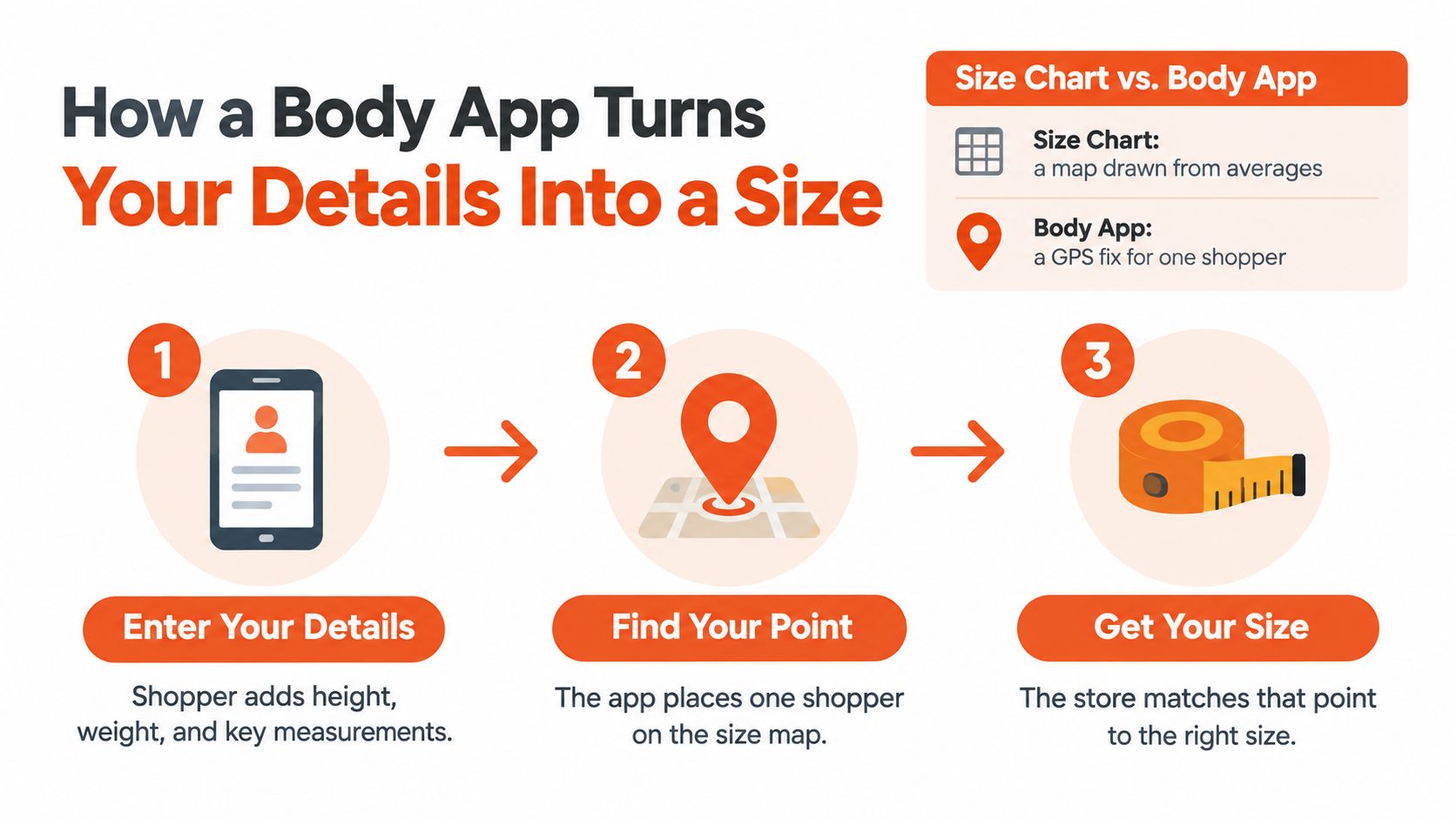
A size chart is a map drawn from averages. A body app works more like a GPS fix, placing one shopper on that map so the store can make a more relevant recommendation.
The map matters because bodies don't share one set of proportions. The U.S. Centers for Disease Control and Prevention's National Center for Health Statistics reports that, among U.S. adults aged 20 and older, average measured height is 68.9 inches for men and 63.5 inches for women; average weight is 199.0 pounds for men and 171.8 pounds for women. Average waist circumference is 40.6 inches for men and 38.5 inches for women. These are averages, not a description of every body shape or proportion.
A useful sizing flow has four stages. Each stage can add helpful detail, but each can also introduce error.
Collect shopper inputs. The app may ask for height, weight, age, and body shape, and may offer an optional selfie. Supporting metric and imperial units makes the form easier for shoppers to complete. A poor-quality selfie or an inaccurate answer can weaken everything that follows.
Build a body model. The system uses those inputs to estimate measurements such as bust, waist, and hip. An unusual proportion can be missed if the model assumes that body dimensions rise and fall together in a predictable way.
Match the model to the product. The app compares the shopper's estimated measurements with that product's own size chart. A brand's size label is not a measurement, and even one brand may use different charts across products. If the chart-to-product match is wrong, the recommendation can fail even when the body estimate is reasonable.
Show a size and uncertainty signal. A useful result explains what size is recommended and whether the estimate is confident or borderline. A single size with no indication of uncertainty can make an uncertain calculation look definite.
For example, Robosize builds a shopper-specific model from a short questionnaire and optional selfie, then displays a size recommendation on the product page. The important evaluation question is not just what inputs it collects, but how reliably it connects those inputs to the measurements and chart for the item being considered.
Accuracy Benchmarks Worth Demanding From a Vendor
A realistic-looking try-on doesn't prove that the app has identified the right size. A polished image can still show the wrong fit, so ask vendors for measurement results, error ranges, and evidence about uncertain cases.
Independent validation of 3D scanning reported intraclass correlation coefficients (ICC) of 0.949 to 0.982 and root-mean-square errors (RMSE) of 1.00 to 2.20 cm against manual measurements. The same validation reports mean differences of approximately 0.30 to 0.80 cm and notes that roughly ±1–2 cm is generally acceptable for garment-making and ergonomic purposes. The anthropometric validation study also identifies circumference measures as the main source of systematic bias. For clothing, that makes bust, waist, hip, and chest measurements especially important to test.
| Benchmark | What it tells you | Reference value | Red flag |
|---|---|---|---|
| Intraclass correlation (ICC) | Agreement with manual measurements | 0.949–0.982 in 3D scan validation | Values well below this range, or no reported figure |
| Root-mean-square error (RMSE) | Average size of measurement error | 1.00–2.20 cm versus manual measures | Errors above 2.20 cm in fit-critical regions |
| Garment tolerance | Error a garment can absorb before the size changes | About ±1–2 cm | Vendor doesn't state a tolerance |
| Bust, waist, and hip accuracy | Accuracy on fit-critical measures | Reported ICC 0.949–0.982 and RMSE 1.00–2.20 cm in scan validation | Only overall accuracy is reported |
| Overall size accuracy, three-input model | Share of correct size predictions in a 677-person study | 89.66% using bust, waist, and hip | Accuracy claim with no list of inputs |
| Per-size precision and recall | Reliability for each size, not the average | Request results for every size | Single headline accuracy only |
| Confidence signal | Whether uncertain cases are flagged | Should flag cases where measurement error could cross a size boundary | Every shopper gets a definitive size |
The 2025 study of 677 women offers a useful reminder that adding more inputs doesn't guarantee a better prediction. A model using bust, waist, and hip reached 89.66% accuracy, while a model using a broader set of measurements reached 68.97%. The same study found that 35.45% of participants didn't fit any single conventional sizing category. The study's results support asking what inputs a model uses and how it handles bodies that don't align neatly with standard sizes.
Overall accuracy can hide poor performance on particular sizes. Ask to see precision, recall, and a confusion matrix by size, not just a single headline score. Confusing adjacent sizes may be a smaller practical problem than recommending a substantially different size, but either error can affect returns and trust.
Practical rule: If the estimated measurement error could push a shopper across a product's size boundary, the app should flag the uncertainty or ask for another input rather than display one size as certain.
When comparing vendors, ask how they benchmark measurements against reference measurements, how they set tighter thresholds for fit-critical regions, and what they show when confidence is low. You can review Robosize's technology details as one example of the product information to check, then ask any vendor to substantiate its own measurement and sizing claims.
Integration and Mobile Checks Before You Buy
Choose the installation route before assessing the widget. A Shopify store may be able to install through a one-click app, while a custom or non-Shopify storefront usually needs a JavaScript snippet and developer time. Robosize offers both approaches; for any vendor, confirm what the team has to configure and maintain. A practical overview of JavaScript snippets for ecommerce sites can help your developers assess what a non-Shopify integration may involve.
Use this checklist during evaluation:
- Chart matching: Can the vendor import your existing size charts and match them to products? Confirm how charts are managed and what happens when a product doesn't match cleanly.
- Units: Can shoppers enter measurements in metric or imperial units without confusing conversions?
- Product imagery: Can the tool work with several product image angles, so shoppers can judge more than a front-facing silhouette?
- Storefront experience: Can you style the widget to suit your theme, and does it load smoothly on product pages?
- Camera flow: Does selfie capture work on a phone in ordinary lighting? Are permission requests clear and easy to decline?
- Fallback: If a shopper refuses camera access, can they use a questionnaire-only route instead?
Mobile testing deserves its own attention. A fitting flow that works in a desktop preview can be awkward on a phone, where shoppers need to enter details, grant permissions, and view results within the same small screen. Test the full journey on a real mid-range device, including camera refusal and a weak or interrupted connection.
Finish with a staging test before opening the feature to every shopper. Install the app on a test storefront, walk through the flow with ten sample shoppers across different body types, and log failures such as a blocked camera, an unclear recommendation, a mismatched chart, or a widget that disrupts the page. Use those failures to decide whether the tool is ready for a live pilot.
Pricing Models and Analytics to Compare
The same headline price can lead to different monthly bills. Start by identifying how the vendor charges, then check the limits and conditions that change the final cost.
| Pricing model | How you pay | Main cost risk |
|---|---|---|
| Per-session plan with overage | Monthly allowance of sessions, then a charge per extra session | Spend spikes during sales; use usage caps |
| Flat monthly subscription | Fixed fee regardless of usage | Session or try-on limits hidden in the fine print |
| Per-catalog or per-SKU fee | Charged by the number of products enabled | Costs climb as the catalog grows |
| Revenue share | Fee tied to sales or orders from the widget | Hard to forecast; attribution rules vary |
| Build in-house | Engineering time, hosting, and ongoing accuracy testing | Maintenance and model updates sit with your team |
A per-session allowance is easy to estimate until a sale drives more shoppers through the fitting room. Ask whether overage charges apply, whether you can set a cap, and whether the vendor sends alerts before you reach the limit. Robosize uses plan-based session allowances with per-session overage pricing and optional caps; compare those terms with the Robosize pricing information and request a written estimate for your expected use.
Once costs are clear, decide what evidence would count as a successful pilot. Track:
- Fitting-room usage: How many product-page shoppers start the tool?
- Recommended-size distribution: Are recommendations spread across the available sizes, or does the app disproportionately suggest one?
- Size-related returns by SKU: Which products improve, and which keep generating fit problems?
- Add-to-cart rate by input method: Do shoppers who use a selfie flow behave differently from those who use a questionnaire?
- Body-data opt-in rate: How many shoppers agree to provide the inputs needed for a recommendation?
Vendor case studies report 17% higher conversion, 24% higher average order value, and 7% lower returns. Treat those figures as vendor-reported outcomes, not a forecast for your store. Product mix, customer habits, and how the tool is implemented can all affect results.
Build a baseline before launch by pulling six months of returns by SKU, then compare the same products after installation. A split test on a defined product group can help separate the tool's effect from broader changes in traffic or merchandising. Include usage and opt-in alongside conversion: a tool that lifts purchases but loses privacy-conscious shoppers before they complete the flow may not be the right experience for your audience.
Fit Uncertainty and Data Questions to Ask
Say a shopper is between sizes and prefers a closer waist fit but more room through the hips. A useful app might recommend size M for a closer waist fit and size L for more hip ease, rather than present one size as certain. That distinction matters because body measurements alone don't describe how a particular garment behaves.
Height and weight can't tell a shopper everything about rise, sleeve length, shoulder width, bust-to-waist ratio, stretch, fabric recovery, or compression. The 2025 global returns report from Rithum says poor fit was cited by 61% of surveyed global consumers. It also reports that 36% said they intentionally overbuy with the intention of returning items, rising to 50% among consumers under 35.
Those findings make uncertainty a product feature, not a weakness. A confident but incorrect recommendation may lead a shopper to buy an item and return it anyway. A tool should explain trade-offs and show when its estimate is borderline, so shoppers can use their own preferences to decide.
Before launch, put these questions to the vendor:
- Is a selfie required or optional? A questionnaire alternative gives shoppers a way to use sizing help without submitting an image.
- Where are images stored, and for how long? Ask whether image data is retained after the fitting session and what controls govern deletion.
- Can body data be reused for marketing? Request a plain-language answer about data use, not just a general privacy statement.
- Can a shopper delete a profile? Confirm how deletion works and what happens to related measurements.
- Is processing local or cloud-based? Ask where the processing occurs and which third parties, if any, handle the data.
- How can a shopper correct wrong measurements? Users need a way to adjust inputs or flag an inaccurate estimate.
Photorealism isn't automatically a sign of quality. If a rendered body looks noticeably different from the shopper or shows a garment inaccurately, it can damage trust; a less literal model may feel more comfortable while still helping someone judge the item. Retailers should measure opt-in and abandonment by input method, not just overall conversion. If shoppers leave when asked for a selfie, that's useful evidence that the flow needs a more private alternative.
Confirm the Fit With a Pilot on Your Highest-Return Products
Choose a tool for the kind of store you run, then test it against the products that cause the most fit-related friction.
- Shopify apparel brand: Prioritize a straightforward installation, confirm the session allowance, and check chart matching on a sample of products.
- Custom-platform direct-to-consumer brand: Budget developer time for the JavaScript setup, then verify that the fitting widget doesn't slow product pages.
- Multi-brand marketplace: Focus on matching many sellers' charts to their products and reviewing recommendations at SKU level.
- Sportswear or jersey retailer: Look for useful multi-angle views and close measurement checks on chest, bust, and hip.
Robosize offers questionnaire or selfie input, multi-angle views, and a one-click Shopify installation. That makes it a possible fit for a store considering those features, but the team should still verify measurement accuracy, privacy controls, and the shopper experience before choosing a vendor.
Start the pilot with the 20 products that have the highest size-related returns. Use the return-baseline method described in the pricing and analytics section, run the app on those products for four to six weeks, and compare return rate, conversion, opt-in by input method, and the share of shoppers who see a confidence warning. Keep the pilot limited enough to inspect product-level results and fix chart or integration issues before scaling.
A fitting tool also depends on trustworthy storefront traffic: retailers assessing their traffic quality can review Securify's guide to filter fake traffic on fashion storefronts. Make the final decision only when the pilot shows whether the app improves outcomes on the products that matter, while respecting shoppers' choices about how they share body data.
Robosize offers an AI virtual fitting room with questionnaire or optional selfie input, product-level size recommendations, and integrations for Shopify and custom storefronts. If you're comparing tools as measurement products rather than magic try-on demos, visit Robosize to review whether its features suit your catalog and pilot requirements.