A clothing fit app stops being a gimmick the moment you look at return economics. A 2026 academic review found an average 36.5% reduction in return rates and a 17.94% increase in conversion rates across studied virtual fitting room deployments, with provider results varying by implementation and use case (academic review). That should reframe the whole category.
Teams still evaluate fit tools like storefront decoration. That's backward. A clothing fit app is a merchandising control layer. It changes how shoppers decide, what they add to cart, whether they hedge with multiple sizes, and how often your ops team pays for reverse logistics. The visual try-on piece matters, but only when it supports a harder commercial outcome: better size confidence on the product page.
Table of Contents
- Why Size Uncertainty Is Apparel's Core Problem
- What a Clothing Fit App Actually Does
- Clothing Fit App vs Traditional Size Chart
- Buyer's Checklist for Ecommerce Retailers
- Shopify App vs JavaScript Snippet Deployment
- Trust, Privacy, and Inclusivity Gaps Most Reviews Skip
- How the Fit Flow Works End to End
- What to Look for Before You Choose
Why Size Uncertainty Is Apparel's Core Problem
Apparel returns have sat in a painful range for years. A Harvard Business School review of virtual dressing room economics noted historical catalog apparel return rates from 12% to 35%, with higher rates in more fit-sensitive categories (Harvard Business School review). The sales channel changed. Shopper uncertainty did not.
That uncertainty is a merchandising problem first.
If a shopper wants the product but cannot predict fit, your PDP stops converting and starts leaking margin. You see it in delayed purchases, duplicate size orders, avoidable support contacts, and returns that were set up before checkout even happened. Style may create demand, but size confidence closes the sale.
The issue is confidence at the point of decision
Many ecommerce teams keep polishing imagery, copy, and reviews while the fit decision stays unresolved. That is a mistake. A shopper who likes the product and still does not trust the size usually takes one of three paths:
- Leaves the PDP: demand existed, purchase confidence did not.
- Orders multiple sizes: revenue goes up briefly, reverse logistics follows.
- Pauses to compare elsewhere: your product enters a comparison set you may not win.
Practical rule: If your PDP answers "Do I want this?" but not "What size should I buy?", you are asking the shopper to absorb the risk you should be handling.
| Metric | Fashion ecommerce baseline | Implication |
|---|---|---|
| Historical catalog apparel returns | 12% to 35% | Fit uncertainty has been a margin problem for decades, per the HBS review cited above |
| Casual apparel returns | 12% to 18% | Even simpler categories lose sales when sizing feels unclear |
| More fitted fashion returns | 20% to 28% | Products with closer fits need decision support, not just measurements |
| High-fashion returns | Up to 35% | Precise silhouettes make wrong-size purchases more expensive |
Why fit apps became necessary
A size chart publishes data. It does not settle doubt. Shoppers still have to translate body measurements, brand grading, product cut, stretch, and personal preference into a size choice. Many will not do that work, and many who try will get it wrong.
That is why a clothing fit app matters as a measurable sales control, not a visual extra. It reduces uncertainty at the exact point where conversion, average order quality, and return risk are decided. It also gives the retailer cleaner signals about where shoppers get stuck, which products create confusion, and whether the recommendation flow is earning trust across regions, body types, and unit systems.
Visual presentation still matters. Strong merchandising, from editorial imagery to modern bra architectural photography, works because shoppers buy what they can picture clearly. Fit tools help when they turn that picture into a buying decision shoppers trust.
For a broader strategy view, Robosize's article on fit in fashion ecommerce is a useful companion read.
What a Clothing Fit App Actually Does
A clothing fit app is software that helps a shopper answer two questions on the product page: what size should I buy, and what will this look like on my body? Good tools answer both quickly. Bad ones turn the process into a survey project.
This visual breaks the category into its three functional parts:
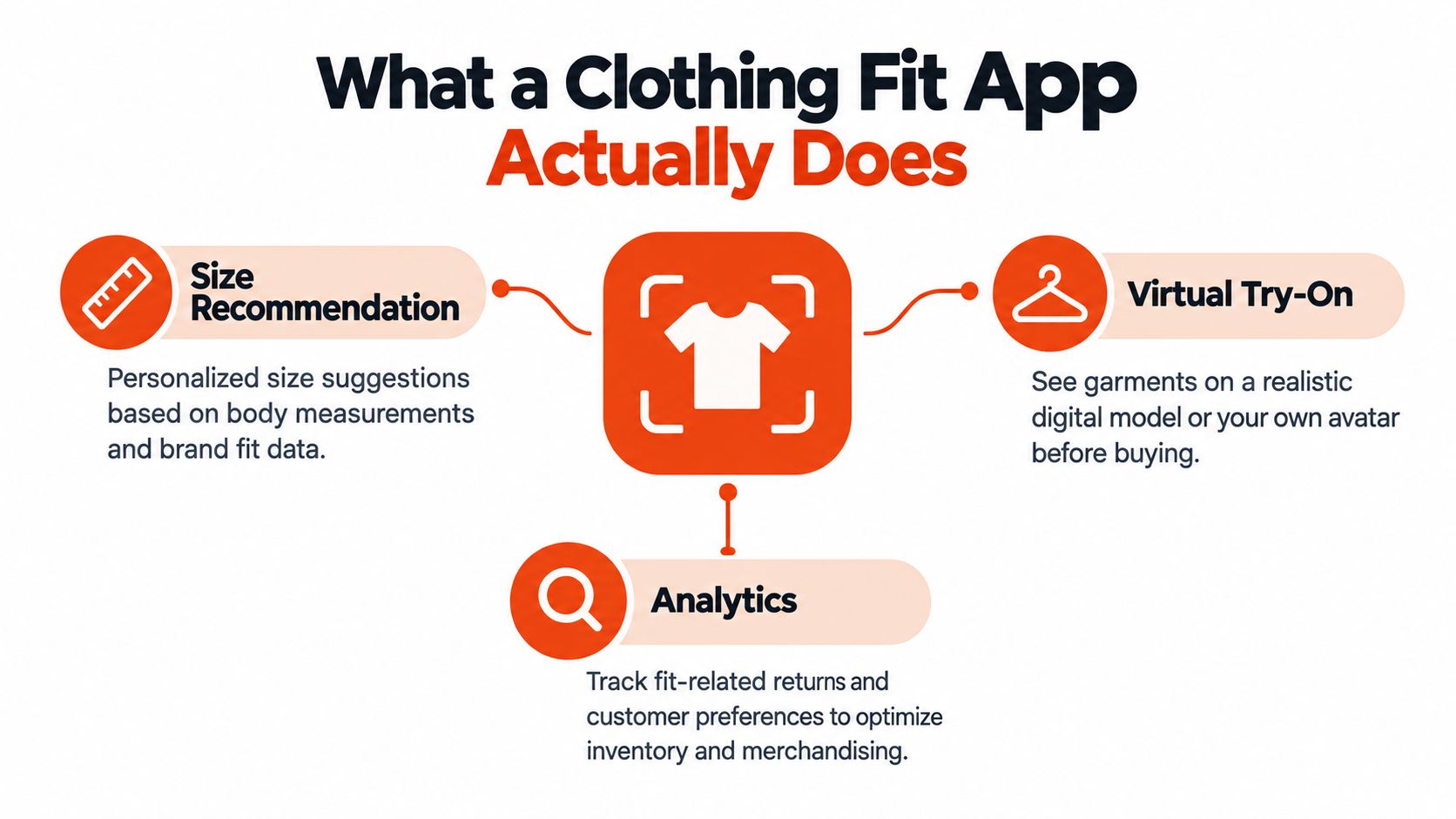
Three functions that matter
The first pillar is size recommendation. This is the commercial core. The app uses shopper inputs, garment data, historical fit behavior, or some combination of those signals to recommend a size for a specific product.
The second is virtual try-on. This helps the shopper judge silhouette, drape, and proportion. It's useful when it clarifies the decision. It's fluff when it only creates a fun animation with no fit logic behind it.
The third is analytics. This is what turns the tool from a widget into a merchandising system. You need to know who opened the fit flow, who completed it, what recommendation was shown, and whether those sessions converted differently from the rest.
What changes on the PDP
A fit tool isn't just another app block. It alters the decision sequence on the page.
Without a fit layer, the shopper reads copy, scans reviews, opens the size chart, and still guesses. With a strong clothing fit app, the page gives a guided answer tied to the actual garment. That shifts the moment of confidence earlier, where it belongs.
If you're evaluating the AR side of the category, this overview of implementing AR in your store is useful because it shows where visualization fits into the wider ecommerce stack. Just don't confuse AR capability with fit intelligence. They aren't the same thing.
Here's a product demo format that helps clarify what shoppers expect from the experience:
A clothing fit app earns its place when it reduces uncertainty faster than a shopper can leave the page.
Clothing Fit App vs Traditional Size Chart
Retailers that treat fit as a support feature leave money on the table. Fit sits closer to merchandising than customer service because it changes which size gets bought, how confidently it gets bought, and whether that order stays out of returns.
A size chart still matters. It just solves a narrower problem.
A chart gives raw measurements and asks the shopper to interpret them against their own body, the garment cut, and the brand's sizing quirks. A fit app closes that interpretation gap. It turns "I think I'm a medium" into "buy medium in this SKU, but size up if you want a looser fit." That is a selling function, not a reference function.
Where the gap shows up
The easiest way to see the difference is on a product page with inconsistent brand fit. A chart can list chest, waist, and inseam. It cannot tell a 5'8" shopper with a 42-inch chest that this brand's medium runs long in the body but tight in the shoulders, or that returns on this specific dress are concentrated in one size because the fabric has less stretch than shoppers expect.
That matters operationally. A fit app can capture completion rate, recommendation rate, acceptance rate, conversion after recommendation, and return behavior by recommended size. A chart gives you a click event at best. One tool creates a measurable feedback loop. The other publishes a table and hopes the shopper does the rest.
As noted earlier, the academic review cited in the introduction found meaningful lifts in conversion and reductions in returns across virtual fitting room deployments. The important point here is not the headline number. It is the mechanism. Personalization changes the purchase decision at the SKU level. Static charts do not.
| Capability | Traditional Size Chart | Clothing Fit App |
|---|---|---|
| Decision support | Shows measurements by size | Recommends a likely size for the shopper |
| Product specificity | Often generic across categories | Can be tied to a specific garment and fit profile |
| Visualization | None beyond static tables | May show avatar or try-on preview |
| Confidence handling | Shopper interprets alone | System can present a primary recommendation and fallback |
| Data capture | No shopper event trail beyond chart click | Tracks fit interactions and recommendation flow |
| Merchandising value | Informational only | Can influence conversion, returns, and bracket behavior |
| Optimization path | Hard to improve beyond copy edits | Can be tested, tuned, and measured over time |
Static charts still have a role
Keep the size chart visible for shoppers who want to verify measurements, compare across brands, or buy for someone else.
Do not ask it to carry the full fit decision. It cannot address trust concerns about recommendation accuracy, it cannot adapt to shoppers who think in centimeters instead of inches, and it cannot explain why one garment in your catalog fits differently from another. A good fit app can handle those barriers directly, and that is why it performs like a merchandising tool instead of a prettier version of the same old chart.
Buyer's Checklist for Ecommerce Retailers
Most fit app evaluations are too shallow. Teams compare screenshots, ask about AI, and get distracted by avatar polish. That's not how you buy this category well. Buy it like a CFO and a merchandising lead sitting in the same room.
Use this as a scorecard, not a wish list:
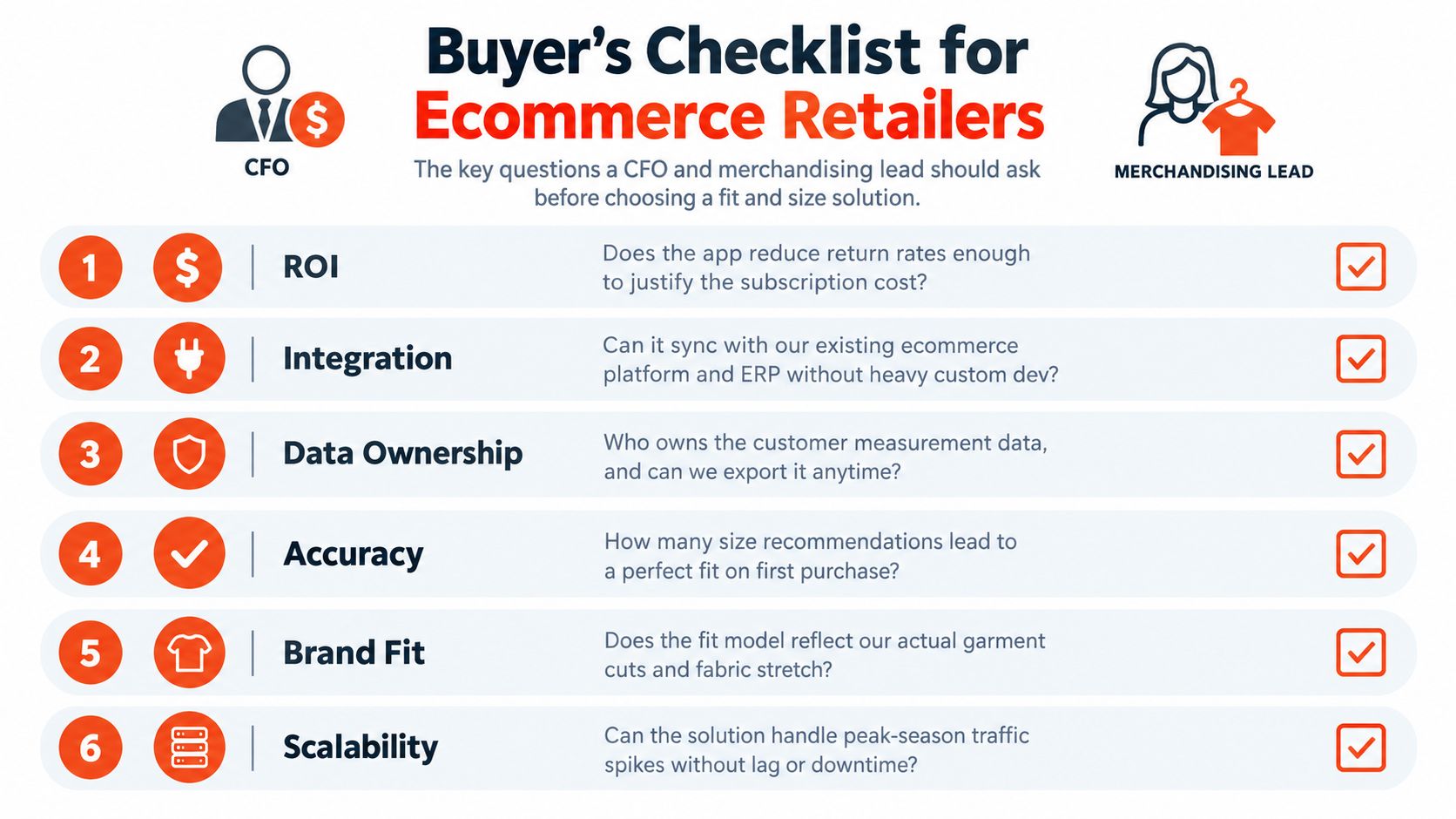
Questions that affect commercial outcomes
Who owns shopper measurement data? If the vendor stores body inputs, inferred measurements, or fit profiles, get the contract language in writing. This affects customer trust, portability, and your ability to preserve learning if you switch vendors.
Does the app read your actual product feed or infer fit loosely? A vendor that maps real variant and size attributes can support better recommendations than one forced to guess from incomplete titles or generic category labels.
What input methods are available? Some shoppers will complete a questionnaire. Some will try photo-based input. Some will do neither. You want multiple paths, not a single mandatory flow that kills PDP engagement.
Questions that expose weak vendors
How do you attribute return-rate impact? If a provider claims reduced returns, ask how they isolate size-related returns from other return reasons. If they can't explain the method clearly, treat the claim as marketing.
Can the fit prompt be A/B tested? If not, you're flying blind. You need to test placement, copy, trigger timing, and whether recommendation display changes add-to-cart behavior.
What happens when the model is uncertain? This is one of the best diagnostic questions you can ask. A serious vendor should have fallback logic, confidence handling, and a clear shopper-facing response when the model can't recommend aggressively.
If a sales rep has a polished demo but no credible answer on uncertainty handling, you're buying UI, not decision infrastructure.
Questions that affect implementation risk
How does pricing scale against contract length? A cheap entry plan can become expensive if usage-based overages spike during campaign periods. Ask how monthly spend is capped and how try-on volume is metered.
What happens to historical fit data if the contract ends? If your team can't export the interaction history, size-selection patterns, and recommendation logs, you're rebuilding your fit learning from zero later.
One practical option in this market is Robosize, which combines questionnaire-based sizing, optional selfie-based try-on, storefront analytics, and deployment through a Shopify app or JavaScript snippet. That's the right product shape for retailers that want both recommendation and visualization in one flow. It still needs the same scrutiny as any other vendor on data ownership, attribution, and fallback behavior.
Shopify App vs JavaScript Snippet Deployment
Deployment choices look minor until implementation starts. Then they determine how fast you launch, how much product data cleanup you need, and how much control your team keeps over the fit experience.
When the Shopify app route makes sense
If you're a Shopify-native brand with a relatively contained catalog, the app route is usually the right first move. Installation is simpler, theme placement is cleaner, and product-feed sync is more straightforward because the vendor works inside Shopify's data model.
That path is best for brands that want speed over flexibility. If you run a small to mid-sized apparel catalog and don't need deep custom UI logic, use the app and get to testing.
| Criteria | Shopify App | JavaScript Snippet |
|---|---|---|
| Setup speed | Faster for Shopify stores | Slower because implementation is mapped manually |
| Platform compatibility | Shopify only | Works across storefront stacks |
| Theme integration | Cleaner through native app blocks | Flexible, but depends on developer implementation |
| Product data model | Bound to Shopify structure | Can be adapted to custom product schemas |
| Custom UI control | More limited | Greater control over placement and interaction design |
| Ongoing maintenance | Simpler for Shopify teams | Requires technical ownership across changes |
| Best fit | Shopify-native brands with simpler needs | Multi-platform, headless, or highly customized storefronts |
When the snippet path is the better choice
The JavaScript snippet route is the better fit for WooCommerce, BigCommerce, Magento, headless storefronts, and agency environments managing mixed stacks. It gives you more control, but your team has to map variant data, size logic, and event tracking correctly.
That's also where hidden costs show up. The snippet itself isn't the hard part. The hard part is feeding the tool clean product attributes and keeping those mappings intact as your catalog changes. If you're exploring this route, a practical technical reference is this overview of a virtual try-on API for ecommerce deployment.
My recommendation is simple. Small Shopify-first apparel brands should start with the app path. Multi-platform retailers and headless teams should skip the illusion of plug-and-play and deploy through the snippet with a developer involved from day one.
Trust, Privacy, and Inclusivity Gaps Most Reviews Skip
Most reviews of clothing fit apps focus on features. That's the wrong frame. Adoption fails less often because a tool lacks one more rendering effect, and more often because shoppers don't trust it, don't want to upload sensitive data, or don't see themselves reflected in how the system handles sizing.
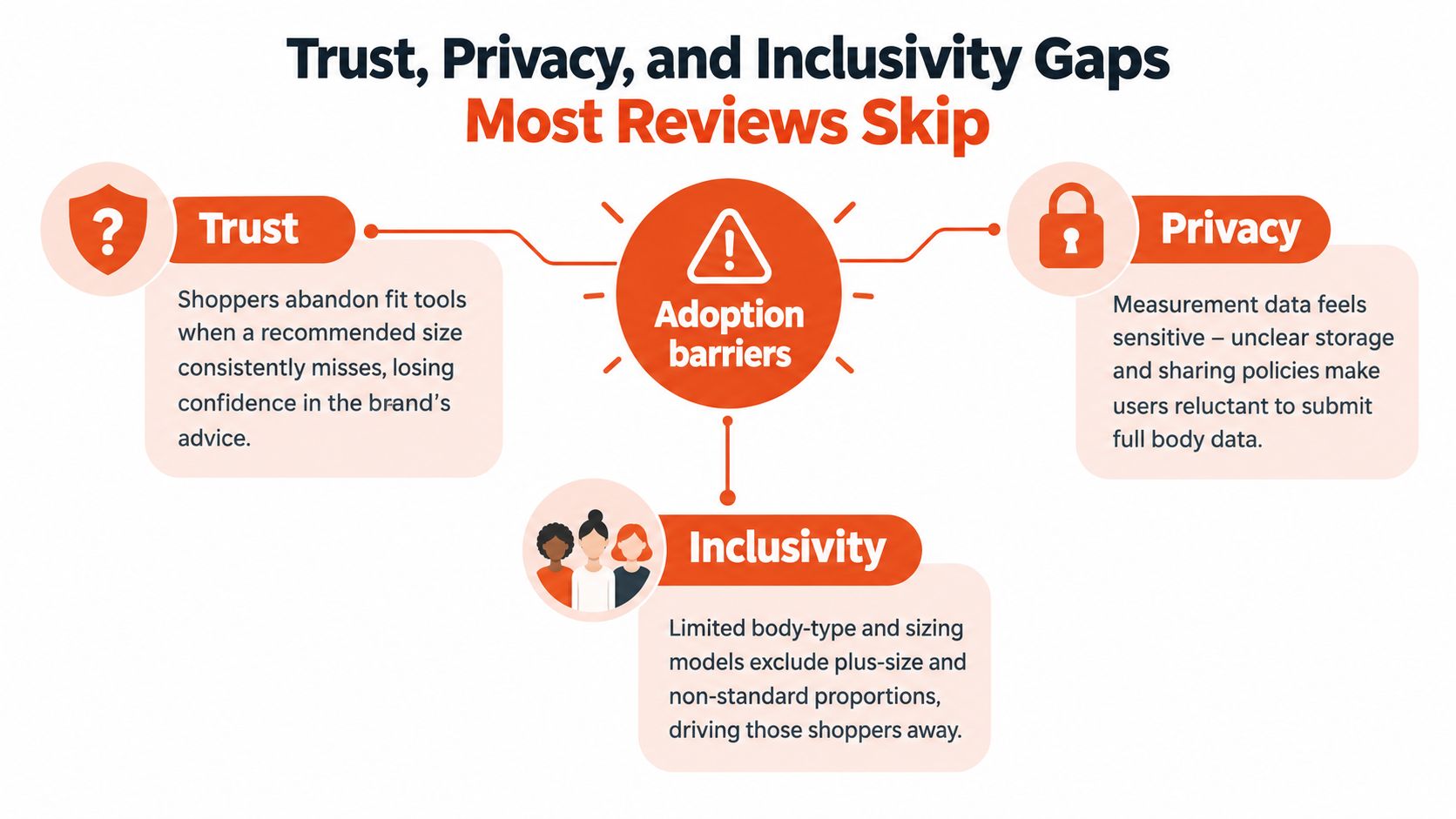
Trust breaks when the recommendation feels opaque
If the app recommends a size that conflicts with the visible size chart and gives no explanation, many shoppers will abandon the tool. They won't assume the model is smarter. They'll assume the brand is inconsistent.
That's why confidence indicators, plain-language explanation, and easy override matter. The recommendation should feel assistive, not authoritarian.
A fit tool shouldn't trap the shopper in its logic. It should help, explain, and get out of the way.
Privacy can't be treated as a footer problem
Independent coverage of the category points to a persistent gap between visual try-on and true fit prediction, while also noting that low-friction data capture is critical because shoppers often abandon manual sizing steps and still return items due to uncertainty (virtual try-on comparison coverage). That has a direct privacy implication. If your flow forces a selfie or heavy body-data input, some shoppers won't start.
Ask vendors these questions before launch:
- Is selfie input optional? It should be.
- Is there a questionnaire-only fallback? There needs to be one.
- Is storage and consent language clear at the point of input? If it's vague, legal and UX problems follow.
Inclusivity is not a brand-value add-on
A clothing fit app that assumes one region's sizing logic will fail for international traffic. Unit confusion between centimeters and inches also creates silent recommendation errors that many teams misread as model weakness.
Ask whether the tool handles metric and imperial systems cleanly, whether it supports cross-market size interpretation, and whether the mobile flow is usable for shoppers who don't want to measure themselves precisely. These aren't edge concerns. They decide whether the tool gets used at all.
How the Fit Flow Works End to End
The fastest way to judge a clothing fit app is to follow the shopper journey from the PDP to cart and ask what data gets captured at each step. If the flow is clumsy, the model quality won't save it.
This process view is what a clean implementation should resemble:
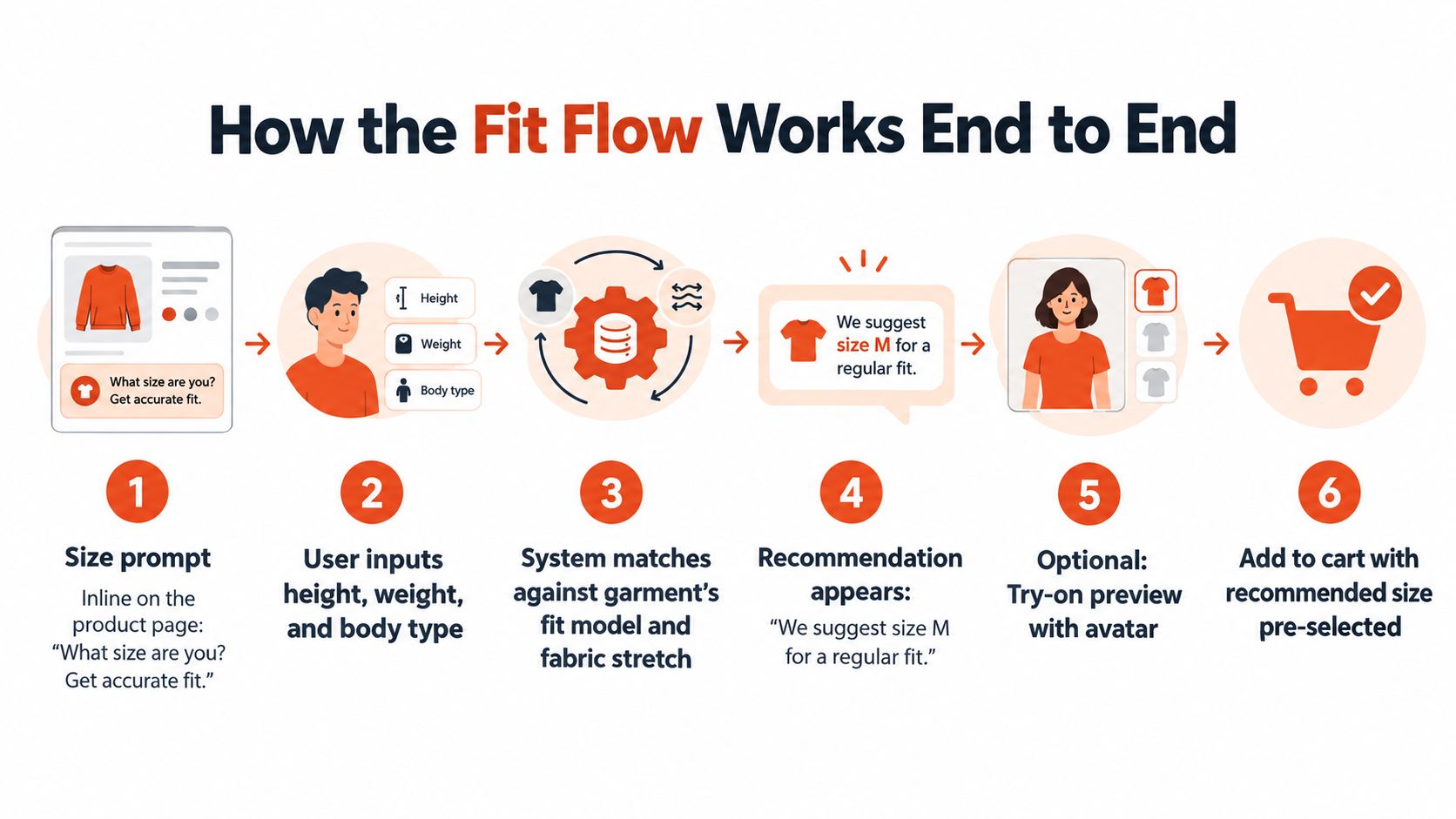
The shopper flow on the product page
The prompt usually sits inline near the add-to-cart area. It asks a direct question tied to fit, not a generic invitation to explore technology. Once opened, the flow collects a short set of inputs such as height, weight, fit preference, and unit preference.
Some tools then offer an optional selfie step. That's where a system can estimate body shape or measurements without forcing the shopper through manual measuring. If you want a technical overview of that process, this explanation of AI body measurements in virtual fitting is useful.
What happens behind the scenes
After the shopper submits data, the engine maps those signals against garment attributes and fit logic. If visualization is enabled, the system can render the product on a generated avatar or body model. The size engine then returns a primary recommendation and, ideally, a fallback if the shopper sits between sizes or fit preferences.
A strong implementation also logs events your team can use:
- Prompt view: who saw the fit entry point
- Questionnaire complete: who finished the input flow
- Selfie consent: who accepted optional image-based input
- Recommendation shown: what size advice was displayed
- Size selected: whether the shopper accepted or overrode the recommendation
Why those events matter
Those events let merchandising and product teams answer the questions that matter. Did the fit prompt increase add-to-cart rate? Which products had high fit-tool engagement but low acceptance of the recommendation? Where did shoppers drop out?
A randomized field experiment in online retail found that adding virtual fit information increased conversion rates and order value while also reducing fulfillment costs tied to returns and home try-on behavior, including ordering multiple sizes of the same item (randomized field experiment). That's the loop to build for. Recommendation on the PDP, cleaner size selection, fewer hedge purchases, and better post-purchase economics.
What to Look for Before You Choose
Here's the blunt version.
Start with fit accuracy and measured return-rate evidence. If the vendor can't explain how the recommendation is generated and how impact is measured, stop the conversation. Pretty rendering doesn't offset weak decision logic.
Second, check unit-system handling and international usability. If the flow gets awkward across centimeters and inches, or doesn't translate well across regional shopping behavior, adoption will sag before the model gets a fair test.
Third, prioritize analytics depth. You need PDP event granularity, recommendation acceptance data, and enough visibility to compare interacted sessions against non-interacted sessions. After that, evaluate privacy posture, then deployment path, then the quality of the virtual try-on layer.
Red flags that should disqualify a vendor
- No measured conversion or return evidence
- Forced selfie input with no fallback
- Unclear answer on what happens when a shopper falls between sizes
- No export path for historical fit data
- A polished demo with weak attribution logic
Ask this before you sign anything: what does your model do when a shopper falls between two sizes, and how do you report that edge case?
Run the decision as a short pilot with one success metric. Either reduce size-related returns or improve add-to-cart rate from sessions that engaged with the fit prompt. If the vendor won't agree to be judged that way, they're not selling a merchandising lever. They're selling theater.
Robosize gives apparel retailers a practical version of this model: product-page size recommendations, optional selfie-based try-on, and deployment through either a Shopify app or JavaScript snippet. If you're evaluating fit tools as a conversion and return-reduction layer instead of a novelty widget, visit Robosize and assess it the same way you should assess any vendor: data quality, shopper trust, and measurable PDP impact.