Augmented reality clothing is a live overlay that places a digital garment on a shopper's body through a device camera and tracks movement in real time, with recent systems reporting pose processing of 8.1 ms to 10.9 ms and 98.1% clothing mapping accuracy across motion conditions. It's useful for judging silhouette and proportion on your own body, but it doesn't reliably prove how a fabric will stretch, compress, or feel.
You're looking at a product page for a jacket that looks perfect on the model. The shoulders sit cleanly, the hem lands exactly where you'd want it, and the color reads rich under studio light. Then doubt arrives, because none of that tells you how it'll sit on your shoulders, in your hallway light, when you turn sideways.
Table of Contents
- Why Augmented Reality Clothing Matters at the Product Page
- How Augmented Reality Clothing Actually Works
- AR Clothing Versus Photorealistic Virtual Try-On
- The Technical Constraints That Shape Real Deployments
- Retail Use Cases Across the Shopper Journey
- Implementation Choices Every Merchant Should Make
- What AR Clothing Does to Conversion, AOV, and Returns
- Honest Limitations and Open Questions for AR Clothing
Why Augmented Reality Clothing Matters at the Product Page
A shopper doesn't usually abandon a cart because she dislikes the dress. She pauses because she can't answer three small questions from a flat photograph. Will the waist land where she expects, will the skirt move or cling, and does the color suit her in ordinary light rather than studio light?
Augmented reality clothing answers the first part of that hesitation directly. Instead of showing the garment on a stock model, it renders a digital garment on the shopper's own body through a phone or mirror camera. The shopper turns, steps back, and raises an arm, and the overlay follows.
The Moment This Technology Is Built For
That moment is specific. It's not browsing for inspiration and it's not checkout payment. It's the pause between interest and commitment, when a shopper is deciding whether to trust a size chart, order two sizes, or leave.
- Silhouette checks: A shopper can see length, proportion, and overall shape against her own frame rather than imagining it.
- Movement checks: Turning reveals whether an overlay holds alignment at the shoulder and hip as pose changes.
- Context checks: Seeing a garment in a bedroom or store aisle gives a rough sense of scale that a white background can't.
None of those checks tells her how denim softens, how a knit compresses, or whether a lining will feel warm. That's a limit you'll need to state plainly rather than hide. AR is strongest when you treat it as a visualisation and confidence tool, not as a guarantee of physical fit.
For you as a merchant, the practical question is therefore narrower than most vendor pitches suggest. Does putting the garment on the shopper, in her space, reduce the specific uncertainty that makes her hesitate, order the wrong size, or return the item? If yes, it's worth piloting. If your returns are driven by fabric hand, warmth, or quality complaints, AR alone won't fix them.
Practical rule: Sell AR to your shopper as a better view, not as a fitting promise. Overpromising fit creates confident wrong purchases.
How Augmented Reality Clothing Actually Works
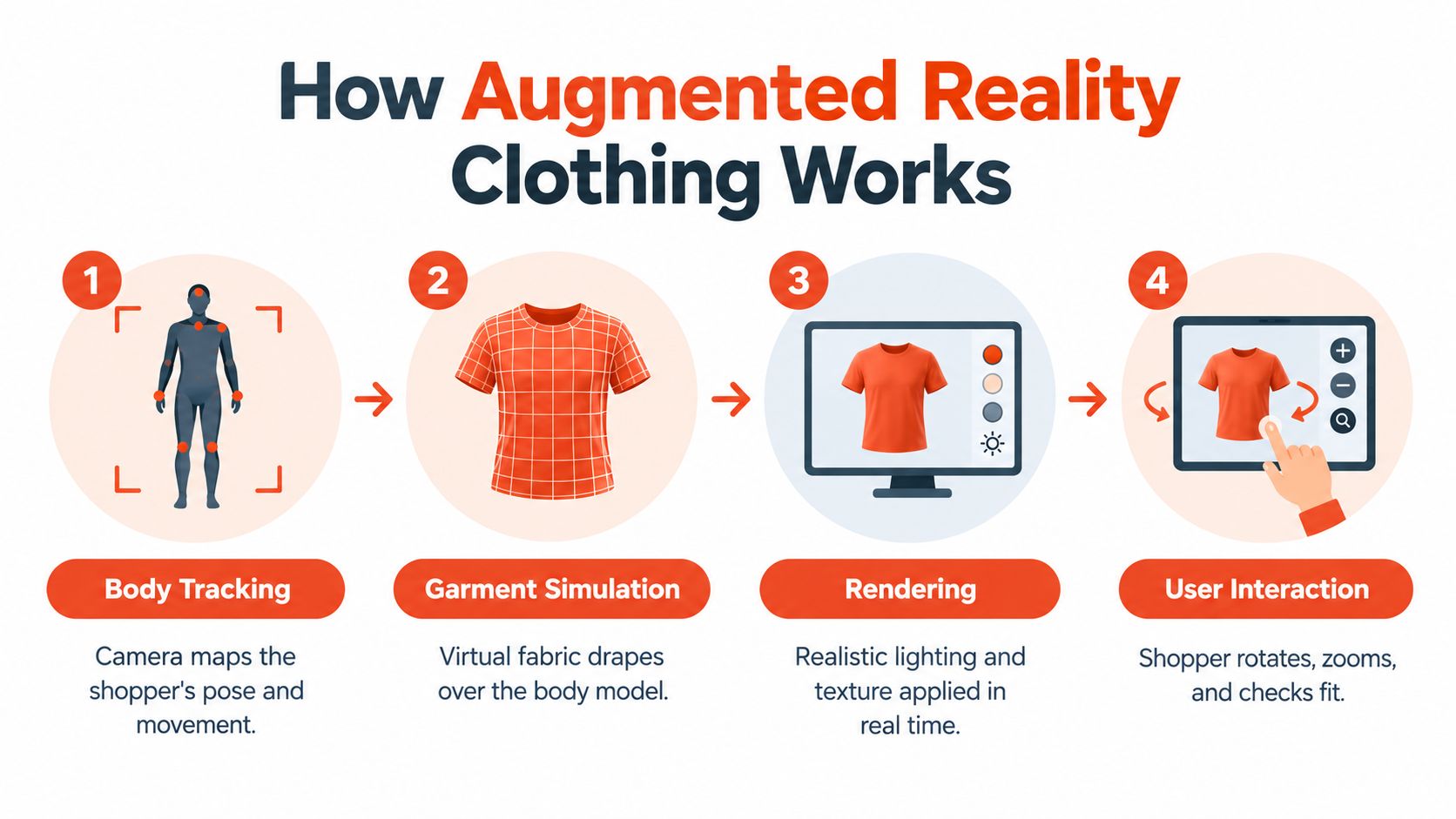
You don't need to understand algorithms to evaluate a vendor. You need to recognise four jobs happening in sequence, and notice which job a sales claim describes.
Four Jobs From Camera to Screen
Think of the pipeline as a chain. If one link is weak, the whole experience looks wrong even when the garment asset itself is beautiful.
- Body or pose tracking: The camera estimates where shoulders, hips, and limbs are, and updates that estimate as the shopper moves.
- Garment asset preparation: Your team or vendor builds a digital version of the garment with size, texture, and drape information attached.
- Real time rendering: The system draws that garment over the live video, matching lighting and perspective as closely as it can.
- Occlusion and compositing: The system decides what should hide what, so an arm crossing the torso appears in front of the virtual fabric.
A clear public example came in January 2024, when San Francisco's de Young Museum presented the Fashioning San Francisco exhibition and its Snapchat AR installation. Visitors could virtually wear three historical outfits, including a 1955 Yves Saint Laurent dress, a 1985 lamé ensemble by Kaisik Wong, and a 1987 velvet gown by Valentino, with body tracking moving the garments as they turned.
That example matters for retail because the pipeline is the same one you'd use on a product page. The goal changes from preservation to purchase confidence, but tracking, rendering, and occlusion still decide whether shoppers trust what they see. When you assess body input methods, it also helps to understand how a human body scanner captures measurements before you decide how much data to ask shoppers for.
Production choices behind the scenes matter as much as the overlay shoppers see. If you're planning richer interactive content around a launch, interactive media AI insights can help you think through how AI assisted production fits your creative workflow. For AR clothing specifically, ask every vendor to walk you through those four jobs using your own garment, on a mid range phone, in normal room light.
AR Clothing Versus Photorealistic Virtual Try-On
Vendors often use AR clothing and virtual try-on as if they're the same product. They're not, and confusing them leads to the wrong purchase. One is live and camera driven, the other usually produces a still or short rendered preview on a shopper specific model.
Two Different Shopper Questions
AR clothing answers a question about presence. How does this look on me, here, as I move? Photorealistic virtual try-on answers a question about appearance in a controlled image. How would this garment look on a body like mine, rendered cleanly enough to judge color, print scale, and proportion?
| Dimension | AR Clothing | Photorealistic Virtual Try-On |
|---|---|---|
| Body input | Live camera feed and pose tracking | Questionnaire, measurements, selfie, or chosen model |
| Rendering pipeline | Real time overlay on video | Generated or composited image, often multi angle |
| Primary shopper question | How does it move and sit on me now | How does it look on a body like mine |
| Best retail use | In store mirrors, live mobile exploration, events | Product pages, size guidance, shareable previews |
| Main weakness | Tracking jitter, lighting, occlusion errors | No live movement, depends on input accuracy |
Neither approach automatically wins on mobile. Live AR can feel engaging, but it demands continuous tracking and rendering while the shopper moves. A still try-on image is easier to load, easier to compare side by side, and often easier to pair with a written size recommendation.
Your catalog also matters at the asset stage. If you're still standardising product imagery before any try-on layer, production-accurate mockup tools are worth reviewing for the earlier job of presenting designs consistently. Clean source assets help both pipelines, because neither can invent accurate print placement or construction details that your files don't contain.
Choose based on the funnel problem you're trying to solve. If shoppers need movement and in context exploration, test AR. If they need a calm, comparable image plus a size answer before checkout, photorealistic try-on usually fits the product page better.
A useful test isn't which technology looks more impressive in a demo. It's which one your shopper can finish, understand, and trust on her phone.
The Technical Constraints That Shape Real Deployments
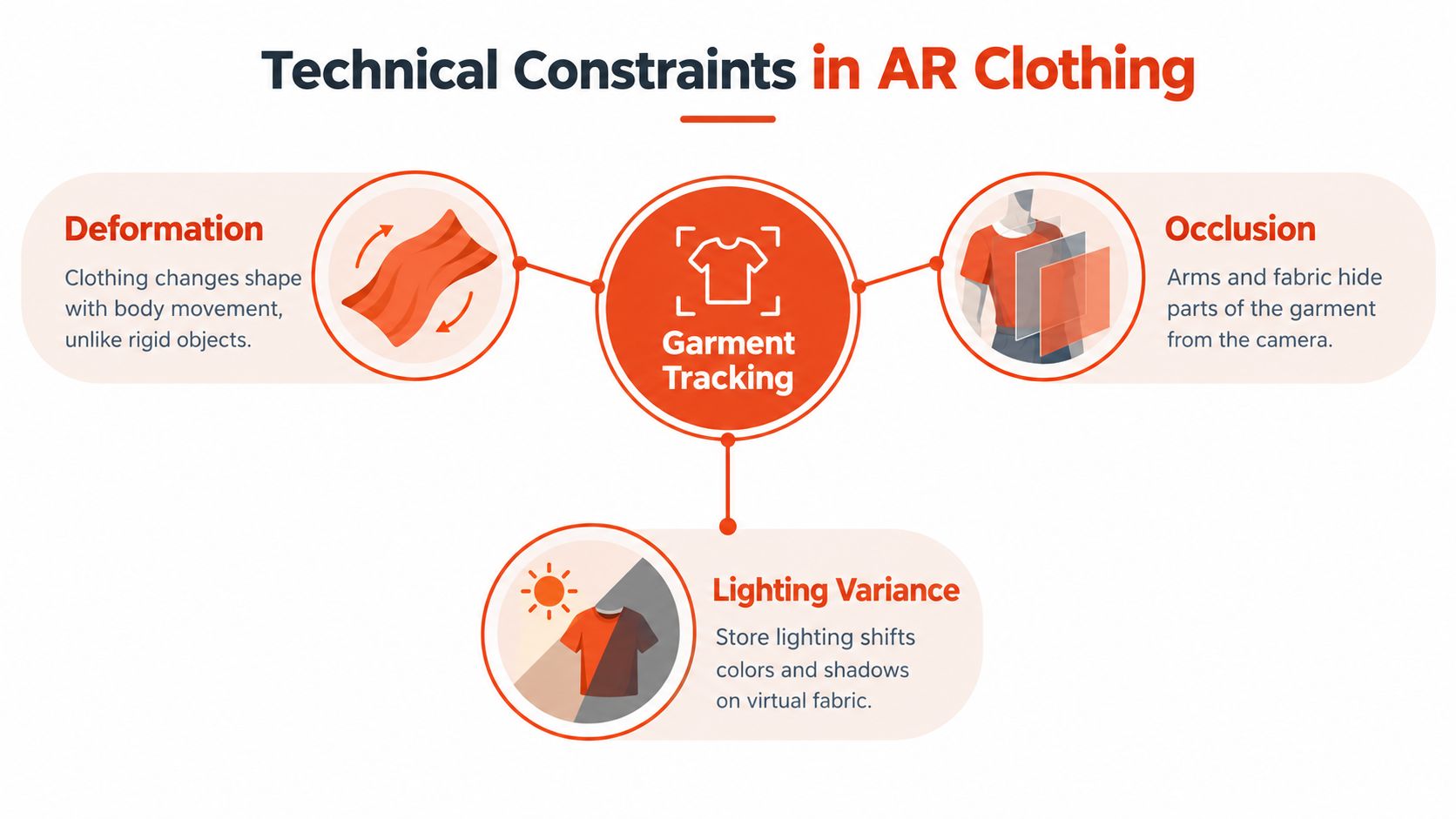
Garments are harder to track than faces or boxes because fabric doesn't behave like a rigid object. It folds, stretches, bends, rotates, and gets hidden by arms. A system that treats a shirt like a flat poster will drift, jitter, or disappear as soon as the shopper moves naturally.
Deformation, Occlusion, and Tracking Loss
Research on AR fashion systems describes deformable surface tracking challenges including folds, occlusion, and tracking loss when movement is rapid, camera distance grows, or the view is obstructed. That research also found that high contrast visual features spread evenly across a garment improve recognition, while dependence on one small logo makes tracking fragile. Cylindrical garment targets could remain trackable during rotation, but virtual elements could vanish under stress.
For your pilot, that translates into unglamorous testing. Walk away from the phone, cross your arms, turn under warm and cool light, and wear busy backgrounds. If the overlay only works when a shopper stands still in a showroom, it isn't ready for bedrooms and store aisles.
Latency Numbers in Merchant Language
A multimodal research system combined wearable sensing with an optical see-through display and reported pose processing latency from 8.1 ms to 10.9 ms and 3.2 mm shoulder position error in low complexity motion. It also reported 98.1% clothing mapping accuracy, 99.5% rendering stability, and a separate 125 ms response for a sensor triggered clothing change.
Don't ask a vendor whether a system is real time. Ask for four separate numbers instead.
- Tracking latency: How quickly the garment follows movement, where sub 20 ms processing helps alignment feel stable.
- Registration error: How far the rendered garment sits from where it should sit on the body.
- Rendering stability: Whether the image stays steady during longer sessions without flicker or drift.
- Interaction latency: How quickly taps, size changes, or sensor triggers produce a visible response.
Those metrics can move independently. A demo can track quickly but register poorly, or render beautifully while size changes lag. Separating them gives you a fair pilot scorecard and stops a single impressive number from hiding a weak link.
Retail Use Cases Across the Shopper Journey
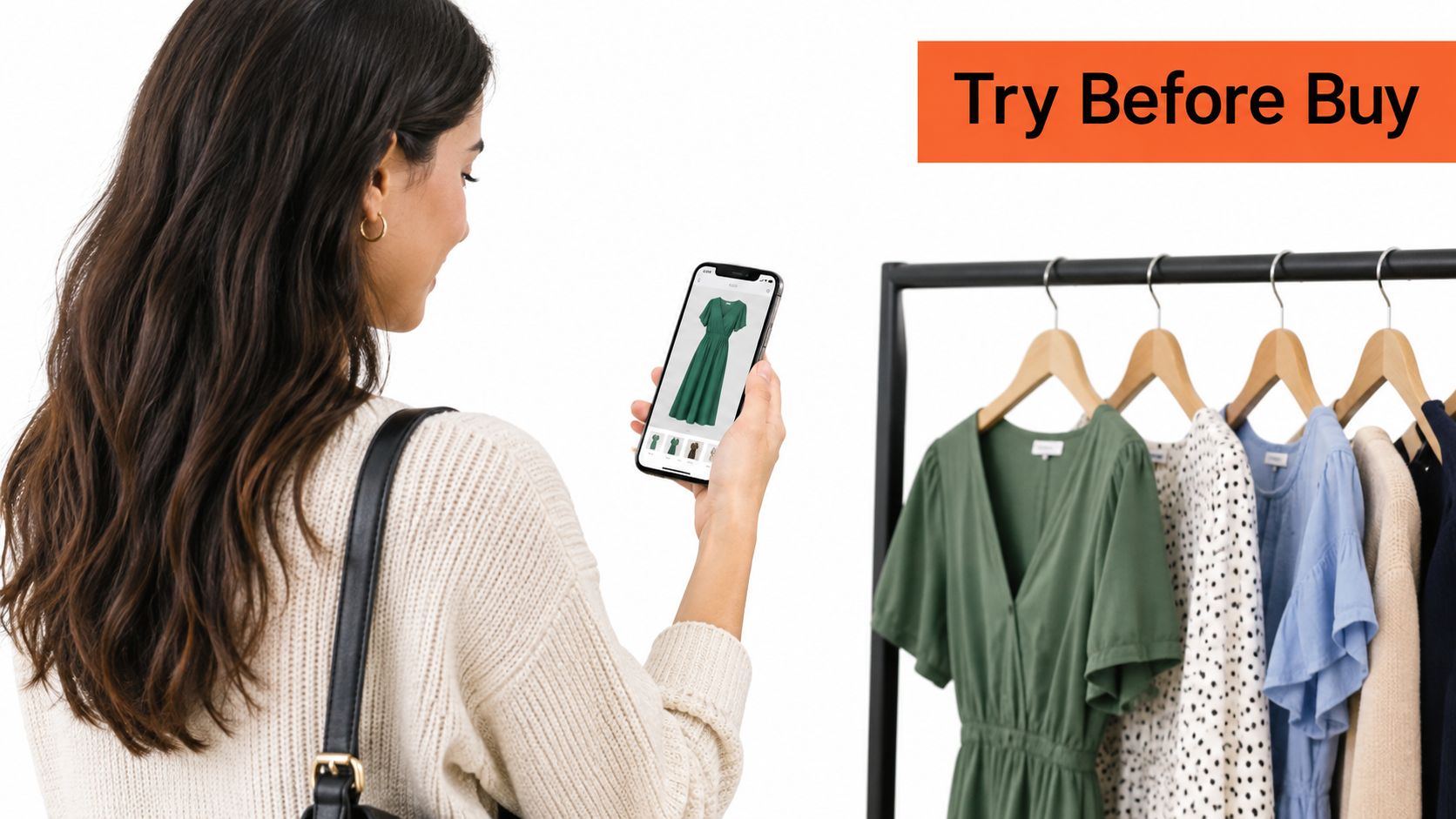
A mobile preview on the product page is the most familiar starting point, because that's where size doubt first appears.
Product Page and Cart
On the product detail page, the job is narrow. Help the shopper judge silhouette, length, and proportion, then connect that view to a size recommendation she can act on. Multi angle rendering helps here because a front view alone can hide how a garment falls at the back or side.
In the cart, the job shifts from exploration to confirmation. A shopper who's already chosen a size may want one final check before paying, especially for occasionwear, tailoring, or sportswear where a wrong choice is easy to imagine. Keep that check optional and fast, or you'll add friction at the worst possible moment.
After Purchase and in Brand Moments
Post purchase, try-on imagery can set expectations while an order ships. It won't change the physical garment, but a preview that was honest about drape limits gives the shopper a reference point when the parcel arrives. That honesty matters more than a polished render that sets her up for disappointment.
This short video shows the basic try-on interaction shoppers expect, with the garment following the person rather than sitting as a static sticker.
Brand storytelling is a different use case entirely. Museum installations, capsule drops, and archive reissues can use AR to let people wear pieces they could never touch or buy. That's valuable for attention and education, but don't measure it with the same dashboard you'd use for size related returns.
Start where the business pain is clearest. For most apparel merchants, that's the product page for a small set of high return, fit sensitive items, not a site wide launch across every category at once.
Implementation Choices Every Merchant Should Make
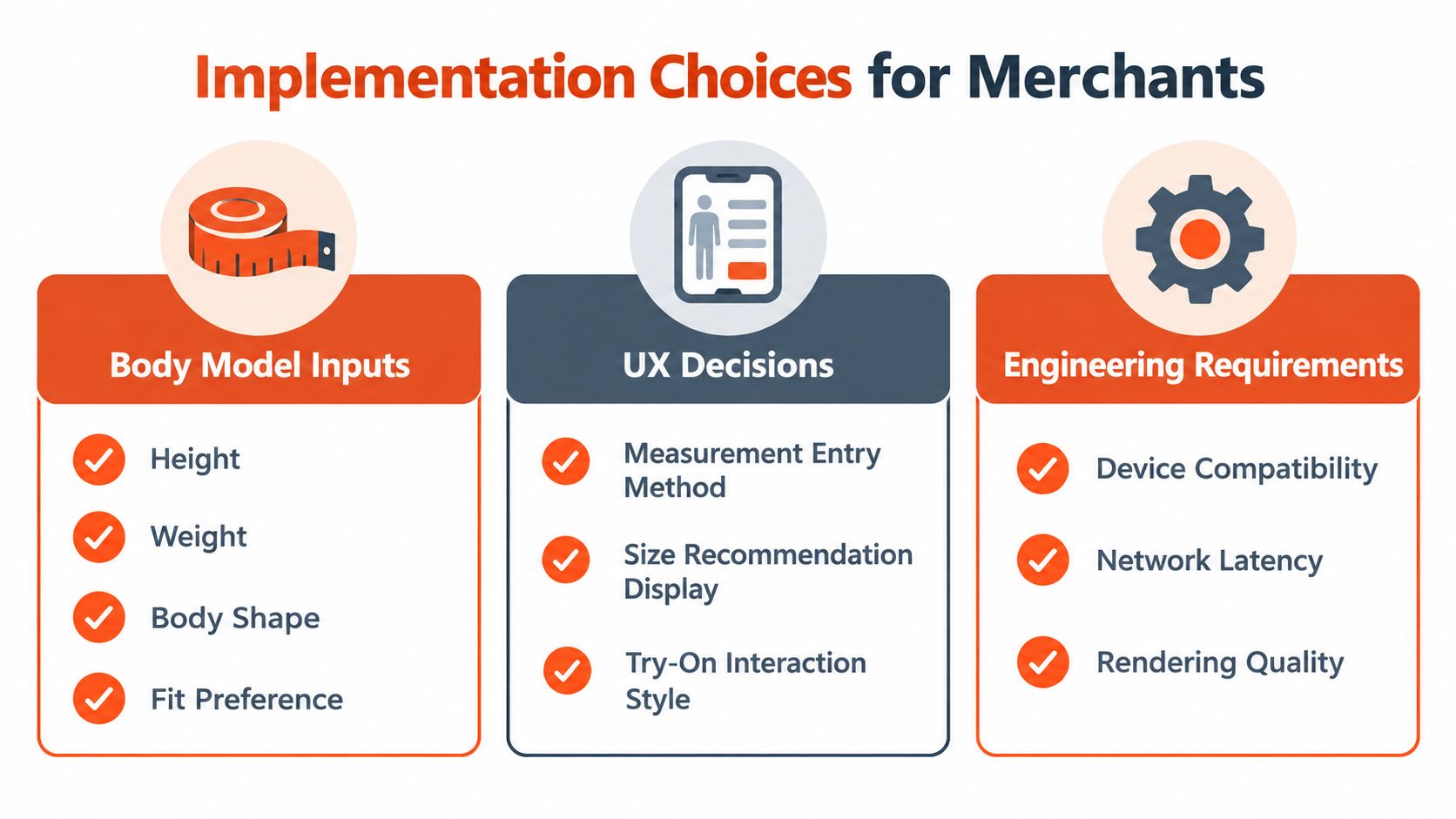
A good implementation isn't a feature list. It's a series of trade-offs about data, friction, cost control, and measurement, and you should make those trade-offs before you sign rather than after launch.
What You Ask the Shopper
A shopper specific body model can be built from inputs such as height, weight, age, and body shape, with an optional selfie for visual previews. Ask too little and the recommendation becomes generic. Ask too much and shoppers abandon the flow before they see any value.
- Keep the first step short: Collect only inputs that change the size or render output.
- Offer a model based alternative: Some shoppers won't upload a selfie, and they still need guidance.
- Support both unit systems: Metric and imperial handling prevents needless errors for international traffic.
- Explain why you ask: A short line about size accuracy improves completion more than a legal paragraph alone.
Robosize is one example of this product page approach, using a short questionnaire and optional selfie to generate a body model, render garments, and recommend a size. Treat that as one implementation pattern to compare, not as the only way to structure the flow.
How You Install and Control It
Installation friction decides whether a pilot happens at all. A one click Shopify app suits many smaller teams, while other storefronts may prefer a small script based integration, and it's worth reviewing how JavaScript code snippets are used for storefront deployment before committing engineering time. Either route should let you style the component so it doesn't look pasted onto your product page.
Budget control deserves the same attention as design. Configurable session caps help you predict monthly spend when try-on usage spikes during a sale or campaign. Multi angle rendering, including up to three viewpoints per session on some plans, can improve confidence but also increases the value you need each session to deliver.
Finally, check the operational basics nobody demos. You need unlimited or manageable size chart uploads, reliable product to chart matching, and analytics showing fitting room usage and recommendation acceptance. Without those, you can't tell whether poor results come from the technology, your size data, or weak placement on the page.
Vendor question: Show me what happens when a shopper gives incomplete inputs, denies camera access, or lands between two sizes.
What AR Clothing Does to Conversion, AOV, and Returns
These three metrics move for different reasons, and you shouldn't credit the same feature for all of them. When you separate the mechanisms, your pilot becomes much easier to judge.
Conversion and Average Order Value
Conversion improves when you remove a specific blocker at the moment it appears. On an apparel product page, that blocker is often size uncertainty rather than price or style. A shopper who can see proportion and receive a garment specific size suggestion has fewer reasons to postpone the decision.
Average order value works differently. A try-on alone doesn't make a basket bigger, but a product recommender tied to the same body profile can suggest additional items likely to fit that shopper. That's a merchandising decision, not a rendering trick, and you should test it separately so you know what's driving basket size.
Category matters too. Intimate apparel shows how specific fit guidance changes behaviour, and shoppers who want to find your right bra and underwear size illustrate why generic charts often fail. The lesson for other categories is to give guidance at garment level, not brand level platitudes.
Returns and What to Measure
Returns fall when expectations are set correctly before shipping. That requires more than a flattering render. You need consistent size data behind the scenes, and a clear view of how clothing size comparison works across brands and charts helps your team spot where shopper confusion begins.
Track outcomes in layers rather than watching revenue alone.
- Fitting room usage: How many eligible shoppers start and finish the flow on mobile and desktop.
- Recommendation acceptance: Whether shoppers buy the size you suggested or override it.
- Size related returns and exchanges: Whether the reason codes you targeted decline after launch.
- Session cost against margin: Whether caps and plan allowances keep the pilot commercially sensible.
Don't treat any vendor supplied outcome as a universal benchmark for your store. Your catalog mix, traffic source, price point, and existing return reasons will shape results. Run the pilot on comparable products, keep a control group where you can, and judge the technology on the metric you said it was hired to move.
Honest Limitations and Open Questions for AR Clothing
The hardest question isn't whether a garment can be placed on a body. It's whether the render tells the truth about fabric behaviour. A dress can sit in exactly the right position and still mislead a shopper about stiffness, thickness, opacity, stretch, or compression.
Silhouette Is Not the Same as Fit
Coverage of digital fashion notes that shoppers still want more realistic fabric simulation and better fitting accuracy from AR clothing, alongside camera based measurement and brand specific recommendations. That distinction matters most in denim, tailoring, sportswear, and occasionwear, where performance depends on material behaviour rather than outline alone.
More visual realism can therefore backfire. If drape physics are wrong, a beautiful render may increase confidence in the wrong size or the wrong garment entirely. Protect shoppers with plain language limits, multiple viewpoints, and confidence cues that say what the preview can and can't show.
Sustainability Claims Need Boundaries
Be careful with environmental claims as well. Academic discussion of digital sampling cites carbon footprint reductions of up to 30% during design and development, but that evidence concerns sampling, not every consumer facing try-on session. Cloud computation, data transfer, phone use, and extra purchases can offset part of any gain.
That doesn't make AR irrelevant to sustainability. It means you should measure size related returns, exchanges, sample production, and infrastructure costs separately instead of using engagement as a proxy. QR linked garment information at the point of purchase may help shoppers act on environmental information, but only if the content is accessible and meaningful.
Privacy and performance belong on the same honest list. Camera access, body data, app permissions, and heavy mobile experiences can all erode trust if you handle them casually. Keep experiences lightweight, explain data use in ordinary language, and give shoppers a useful route that doesn't require a selfie.
Pilot small, disclose limits, and revisit your assumptions with real return reason data. AR clothing is most valuable when it answers the questions it's good at, and stays silent where physical handling still knows more.
If you're ready to test whether clearer fit guidance can reduce hesitation on your own product pages, Robosize offers an AI virtual fitting room that builds a shopper specific body model from a short questionnaire and optional selfie, renders garments photorealistically, and recommends a precise size. Visit Robosize to explore the Shopify app or JavaScript installation and plan a focused pilot on your most fit sensitive products.