The most popular advice about skinning 3D models is to bind automatically, smooth the weights, and keep painting until the character looks right. That's a reasonable starting point, but a poor acceptance test. You can't paint your way out of a broken bind, an unsuitable deformation algorithm, or a skirt that shouldn't follow the legs in the first place.
A dependable workflow treats skinning as an engineering task with an artistic review. Validate the inputs, choose the deformation method deliberately, and measure the result under motion, not just under flattering viewport lighting.
Table of Contents
- What Skinning 3D Models Actually Means
- Preparing the Mesh and Skeleton for a Clean Bind
- Binding Methods in Blender, Maya, and 3ds Max
- Weight Painting Technique That Actually Holds Up
- LBS vs Dual-Quaternion Skinning for Game Rigs
- Skinning Apparel and Loose Clothing on Virtual Bodies
- Validation Poses and Production QA for Skinned Assets
What Skinning 3D Models Actually Means
Skinning isn't texture application. Textures describe surface appearance; skeletal skinning determines how geometry moves. A skinned mesh attaches to a hierarchy of joints, and each vertex follows a weighted combination of joint transformations.
The Khronos glTF skinning tutorial makes that relationship explicit: a skin stores a joints array and an inverseBindMatrices reference, with a floating-point 4×4 inverse-bind matrix per joint and an accessor containing at least as many elements as the joint array. Joint order and matrix order must correspond. Otherwise, valid-looking weights can drive vertices through the wrong transformations.
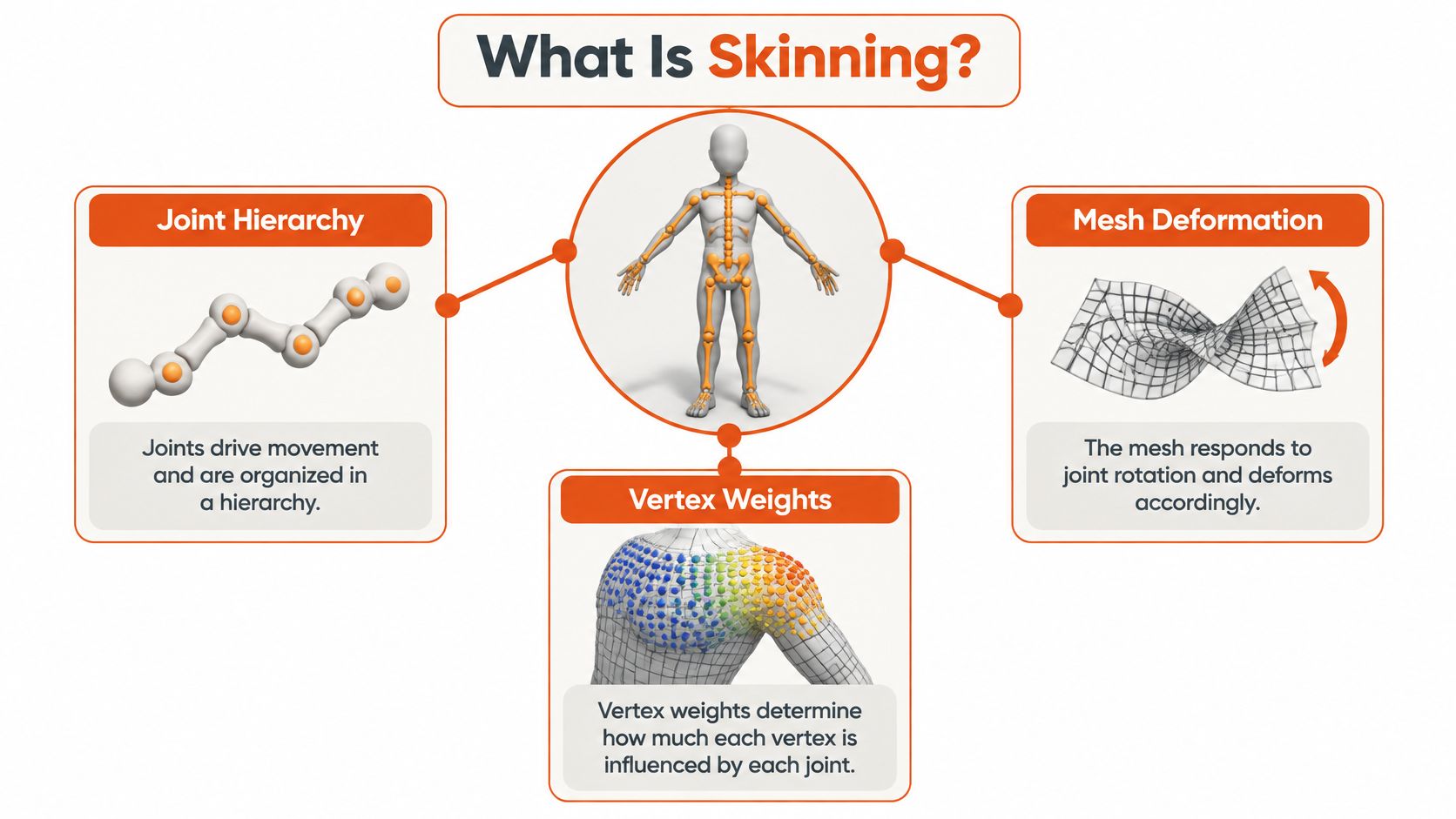
The vocabulary that matters
- Joint hierarchy: The parent-child structure that defines articulated movement.
- Bones: The rig elements artists position and manipulate to control that structure.
- Influences: The joints allowed to affect a particular vertex.
- Weights: The relative contribution of those influences.
- Normalization: Keeping the combined contribution consistent when weights change.
The bind pose is the reference configuration connecting the mesh and skeleton. Inverse-bind transforms account for that original relationship when the skeleton moves. Don't treat them as disposable export metadata.
Separating geometry from animation lets the same mesh respond to different poses without rebuilding its surface. For body visualization, it's also important to distinguish the underlying body shape from its articulation. A height and weight visualizer concerns body representation; skinning concerns how that representation deforms.
Practical rule: Diagnose transformation errors before judging weight-painting quality.
A clean skin therefore isn't an attractive color gradient in the viewport. It's a valid relationship among geometry, joint indices, weights, and bind transforms. Artistic judgment still matters, especially for silhouette and anatomy, but it operates on top of that mathematical contract.
Preparing the Mesh and Skeleton for a Clean Bind
Before binding, make the mesh and skeleton agree about space, scale, and the reference pose. My recommendation is to save an explicit pre-bind checkpoint and reject questionable inputs there, rather than compensating for them with weights.
Start with topology around moving regions. Check whether the available edges can describe the intended elbow crease, shoulder contour, or hip fold. Remove unintended duplicate vertices and inspect disconnected pieces, but don't weld garment layers or accessories merely to make the object look cleaner.
Establish a stable reference
Treat these as pre-bind checks rather than cleanup suggestions:
- Geometry integrity: Inspect normals, accidental internal surfaces, and unintended open boundaries.
- Transform consistency: Verify mesh and skeleton scale against the project's unit convention. Apply or freeze transforms according to the destination pipeline, not indiscriminately.
- Hierarchy clarity: Confirm parent chains, root orientation, joint naming, and local rotation conventions.
- Symmetry intent: Distinguish deliberate asymmetry from a character that only appears mirrored.
- Reference preservation: Save the neutral mesh, skeleton pose, and transform state for later comparison.
Place joints according to the intended pivot, not just the visible center of the limb. Decide where twist or helper bones belong before binding, and keep deformation bones distinguishable from animator controls.
For bodies derived from capture, review shape quality before rigging. A human body scanner workflow provides useful context for separating body acquisition from the deformation work that follows.
Make preparation measurable
Record mesh bounds, vertex correspondence, joint positions, and neutral-pose silhouettes as your baseline. Require unexplained differences to be resolved before binding.
A useful acceptance test is a round trip through the intended export path without animation. If the reference mesh returns shifted, rescaled, or visibly altered, stop there. Painting weights on top of an unstable reference only makes the eventual repair more expensive.
Binding Methods in Blender, Maya, and 3ds Max
Choose a binding method by the geometry you have, not by the application's most convenient button. For production purposes, I treat every automatic result as a proposed influence assignment that still needs review.
In Blender, Parent With Automatic Weights is a useful first attempt for an organic body. With Empty Groups is the more deliberate route when you already know which bones should own rigid pieces or isolated components.
In Maya, start with Smooth Bind and choose the available binding options deliberately, including heat-map approaches where appropriate. In 3ds Max, the Skin modifier gives you an envelope-based starting point that you can refine through explicit vertex weights.
Binding Method Comparison Across DCC Tools
| Tool | Default Bind Method | Best For | Common Failure Mode |
|---|---|---|---|
| Blender | Automatic weights, or empty groups for explicit assignment | Organic first passes; controlled assignments for separate parts | Unwanted influence between nearby surfaces |
| Maya | Smooth Bind with a selected bind method | Character meshes needing configurable influence assignment | Cleanup around crowded joints and adjacent geometry |
| 3ds Max | Skin modifier with envelope falloff | Broad regional assignment followed by vertex refinement | Envelopes affecting geometry outside the intended region |
These are starting workflows, not claims that every installation or studio preset behaves identically. Check your application version and saved settings before comparing results.
Judge the assignment before smoothing
Inspect which joints received influence before asking whether the transition looks smooth. A beautifully blended weight field is still wrong if a jacket panel belongs to the opposite arm.
- Organic body: Try automatic binding, then inspect joint boundaries and narrow gaps.
- Mechanical assembly: Prefer explicit assignment where parts should remain rigid.
- Layered garment: Isolate components and constrain candidate influences before accepting an automatic result.
- Dense mesh: Test whether the additional geometry improves deformation rather than merely increasing cleanup effort.
For an initial bind report, flag unassigned vertices, unexpected influence regions, and vertices connected to joints outside their intended anatomical or garment region. Compare candidate methods on the same pose set. Don't choose the winner from the neutral pose.
Weight Painting Technique That Actually Holds Up
A weight map should describe intended motion, not merely proximity. Around a shoulder, ask which structures should carry the surface as the arm lifts. Around a wrist, distinguish hand ownership from the transition into the forearm.
The most useful painting sequence is assign, pose, adjust, then smooth. Starting with broad smoothing makes it harder to see whether the original ownership was correct.
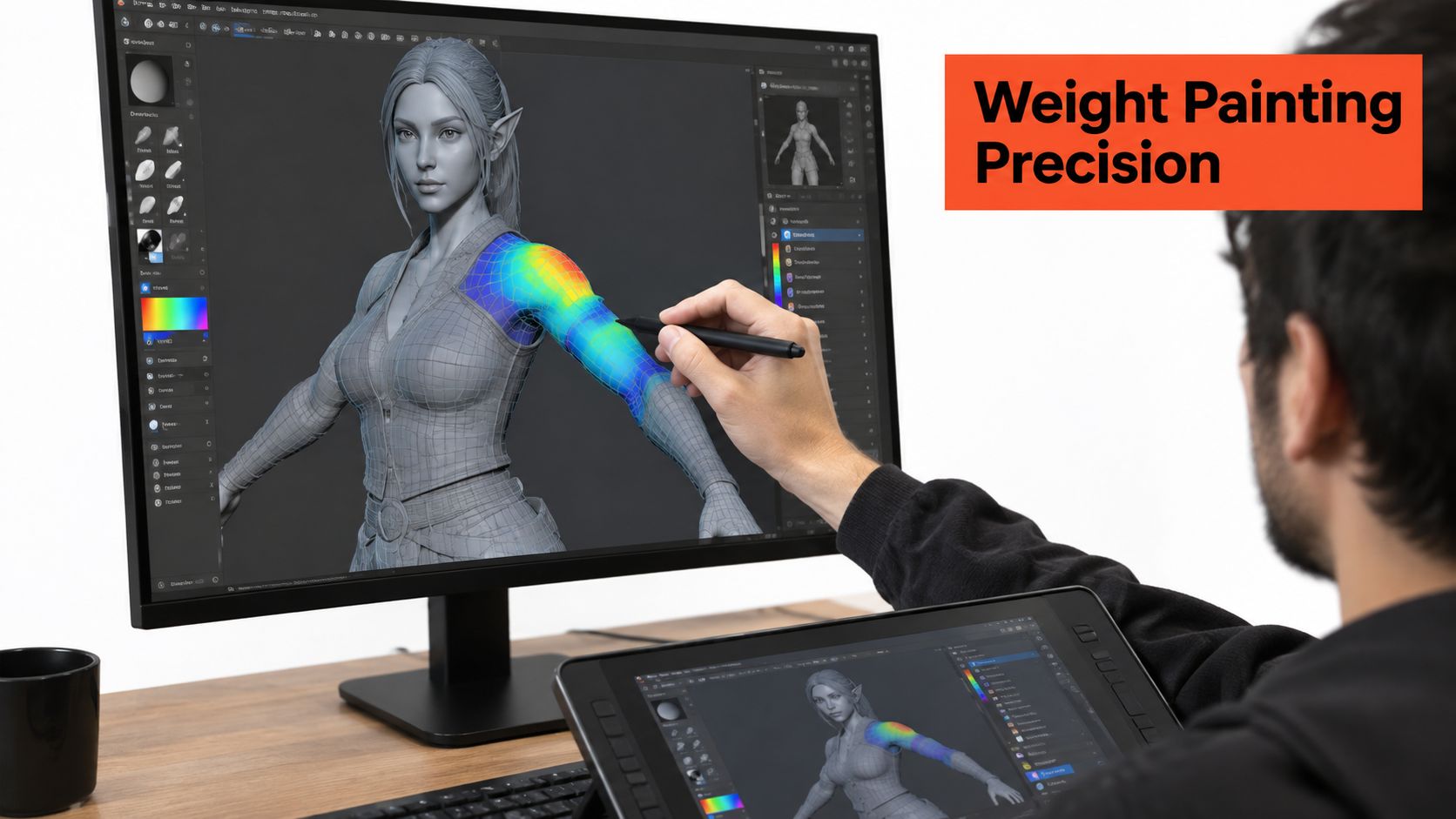
Paint ownership before transitions
Establish primary regions with deliberate assignments. Lock influences you want to preserve, introduce the adjacent contributions, and use smoothing locally rather than across the entire limb.
Blender's Weight Paint tools, Maya's Paint Skin Weights tools, and 3ds Max's Skin weight-editing tools can all support that routine. The important choice isn't the brush name. It's whether the operation changes the intended influence distribution without disturbing already approved areas.
Avoid universal secondary-weight recipes. A suitable distribution depends on topology, joint placement, and the requested motion. Normalization applies to the combined weights, not to making every dominant influence reach the same value.
Smooth a transition because the motion needs it, not because the weight colors look uneven.
Audit the result
- Weight validity: Check normalization and reject unassigned vertices.
- Influence locality: Find isolated weighted patches far from the intended joint region.
- Mirror correspondence: Compare matching vertices where the asset is meant to be symmetric.
- Transition behavior: Inspect how the gradient changes the moving silhouette.
- Edit stability: Recheck approved areas after pruning, smoothing, or mirroring.
Mirror early enough to avoid duplicating cleanup, then inspect the center seam and any intentionally asymmetric details. Don't force symmetry onto an asymmetric garment.
When a correction improves one pose but damages another, stop chasing brush settings. Reconsider the joint placement, topology, or deformation method. Weight painting is powerful, but it can't provide geometry or motion behavior the rig doesn't contain.
LBS vs Dual-Quaternion Skinning for Game Rigs
Linear blend skinning, or LBS, blends joint transformation matrices. Its attraction is computational simplicity; its weakness is what happens when those blended matrices no longer behave like a clean rigid rotation.
Under substantial twist, the surface can narrow into the familiar candy-wrapper artifact. Dual-quaternion skinning, or DQS, blends a different transformation representation and avoids that particular matrix-interpolation collapse. It isn't a universal upgrade.
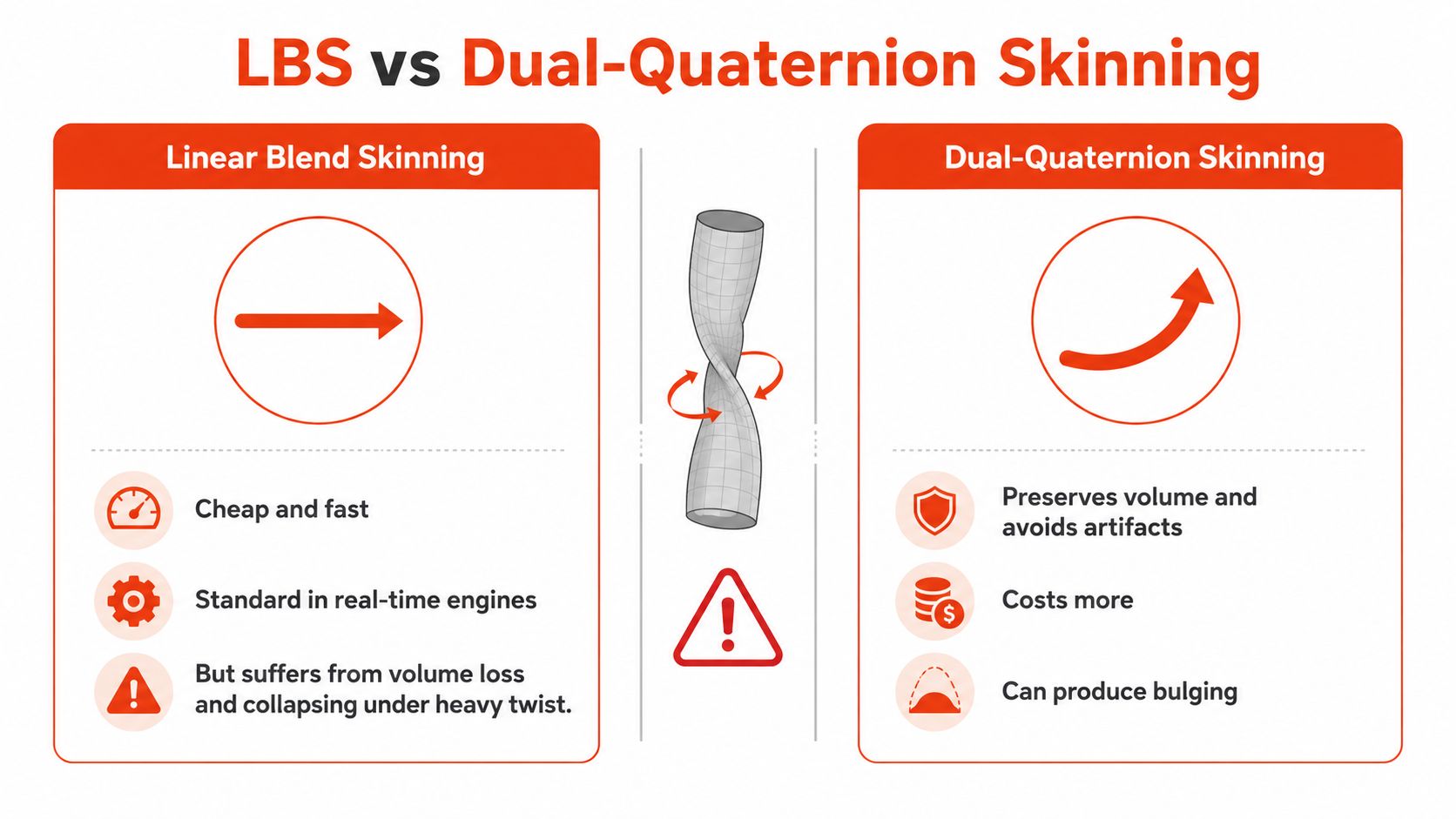
Compare failure modes, not labels
The dual-quaternion skinning technical reference describes implementation trade-offs including seven additional vertex-shader instructions in one implementation, with scale-and-shear handling adding 29 more instructions through a two-phase method. Those are implementation-specific costs, not a promise about your engine's frame time.
DQS can introduce bulging around bent joints, distorted normals, and rotation-path problems. It also doesn't natively represent scale or shear. Test those conditions explicitly instead of approving it after a successful forearm twist.
| Deformation requirement | Candidate approach | Main acceptance concern |
|---|---|---|
| Twist-heavy limb | DQS or a supported hybrid | Twist silhouette and normal stability |
| Volume-sensitive bend | LBS with corrective shapes, or corrected DQS | Unwanted bulging or collapse |
| Scaled hierarchy | Verified scale-aware implementation | Consistent transformation behavior |
| Strict runtime budget | LBS with targeted refinement | Deformation quality within measured cost |
Verify the destination implementation
Don't assume that selecting DQS in the authoring package changes the destination renderer. Confirm what the exported asset and runtime support, including any per-region blending controls.
Where full nonlinear deformation is impractical, helper bones can be a useful compromise. Keep them targeted to visible failures rather than adding them across the entire rig.
The decision criterion should be deformation improvement per runtime cost on the target device. Compare the same mesh, poses, camera, and lighting. A superior viewport result doesn't justify an implementation the shipped shader can't reproduce.
Skinning Apparel and Loose Clothing on Virtual Bodies
Consider a hypothetical outfit consisting of a fitted shirt, a loose skirt, and a jacket. Transferring body weights may give the shirt a useful starting motion. Apply the same assumption to the skirt and jacket, however, and you're asking fabric to behave like the anatomy underneath.
The central distinction is independent drape. Research on nonlinear, history-dependent apparel deformation identifies why joint-driven weights alone are insufficient for loose clothing, folds, and other non-rigid effects. A garment can occupy different shapes at the same body pose depending on the movement that preceded it.

Assign behavior by garment region
For the hypothetical skirt, don't let proximity to the legs determine the entire hem's behavior. Consider a dedicated skirt rig, cloth-aware deformation, or a combination of a stable skinned base and a separate dynamic layer.
For the jacket, evaluate the opening, sleeves, hem, and torso clearance independently. A corrective shape may address a repeatable collision, while motion-dependent swinging calls for a different solution.
Layering also needs visual references. Cashmere Boutique's guide to cashmere layering with button downs is useful as a styling reference for the layered combinations an artist might need to represent, not as evidence about deformation algorithms.
- Close-fitting regions: Start with body-related weights and pose-specific corrections.
- Loose panels: Consider dedicated controls or simulation where movement must be independent.
- Contact regions: Validate collisions between the body and every garment layer.
- Visible folds: Check stability across movement, not just detail in a still image.
Garment rule: If the fabric must hang independently, body-following weights alone aren't an adequate fit model.
Review penetration, silhouette deviation, and fold stability against garment-specific references. Keep that evaluation separate from lighting and materials: photorealistic rendering can improve presentation, but it can't make incorrect drape physically convincing.
Validation Poses and Production QA for Skinned Assets
A neutral-pose approval is an input check, not a deformation sign-off. Build a repeatable test asset or pose library and run it whenever topology, weights, skeleton structure, or export settings change.
Separate diagnostic poses from representative animation. Diagnostic poses isolate a failure; animation shows whether the failure matters during the intended experience. You need both.
Exercise the rig deliberately
Use 90° and 180° bends at elbows, knees, shoulders, and hips as diagnostic stress tests, then isolate axial twists and combine bending with twisting, following the deformation-testing approach described in the published skinning refinement work. Treat anatomically implausible extremes as stress tests, not required production poses.
Inspect silhouette, volume, normals, and texture stretching. Compare the result against the saved reference and intended anatomical proportions, using the earlier algorithm-specific checks where relevant.
- Pose coverage: Track which joints and motion combinations have been exercised.
- Collision coverage: Record body-to-garment, garment-to-garment, and self-intersection failures.
- Surface quality: Compare silhouettes and inspect shading discontinuities.
- Temporal behavior: Look for popping, unstable wrinkles, and abrupt corrective transitions.
- Runtime behavior: Capture deformation time and memory on the actual delivery device.
A checker material is useful for separating surface stretch from texture content. Fixed cameras and consistent lighting make comparisons more reliable than freely orbiting around each revision.
Define acceptance before reviewing
Choose reference surfaces or silhouettes for important views. Measure distance from those references, count or measure penetration events, and record how long failures persist during animation.
There's no universal acceptance threshold for every garment. A fitted sleeve, open jacket, and loose dress need different tolerances and different reference expectations. Define those tolerances with technical art, garment specialists, and the delivery team before reviewing a catalog.
For automated reports, keep the diagnostic output actionable: identify the garment, body variant, pose, affected region, and failing measurement. A single aggregate score can hide a severe local defect.
Keep weight data economical
The research on sparse skinning-weight representations describes assets exceeding 100,000 vertices and 100 joints, making a direct weight matrix exceed 10 million elements, while production vertices commonly depend on no more than four joints. That distinction makes sparse-weight auditing a practical production concern, not just a storage optimization.
Audit influence counts, prune negligible contributions carefully, and compare the deformed result before accepting the change. Don't reduce influences blindly and assume the silhouette survived.
Choose the delivery strategy
| Target | Binding and weight strategy | Deformation priority |
|---|---|---|
| Stylized game character | Automatic starting bind with explicit regional cleanup | Stable silhouette and economical runtime |
| Cinematic hero | Art-directed weights and authored corrections | Close-up shape control |
| Real-time apparel | Constrained garment assignments and selective secondary deformation | Contact quality within device budgets |
| Virtual try-on | Body-variant testing with garment-aware deformation | Credible fit across shapes and sizes |
Before delivery, verify corrective-shape export, helper-bone evaluation, bind-transform consistency, and the target shader's joint and influence limits. Reimport the exported asset into the destination environment and run the same tests there.
Learned residual deformation and partially skinning-free garment approaches are worth evaluating when conventional methods fail. Treat them as candidates with their own data, stability, and deployment requirements, not automatic replacements.
Start with the asset your current workflow handles worst. Build its pose matrix, establish measurable acceptance criteria, and compare the simplest viable deformation methods before applying the workflow across the catalog.
Robosize offers shopper-specific body visualization, photorealistic virtual try-on, and garment-specific size recommendations for online apparel retailers. If you're evaluating how to present fit on different bodies, visit Robosize to explore its fitting-room experience and Shopify or JavaScript integration options.